Nút Hòa Trộn Màu [Mix Color Node]
"Nút Hòa Trộn" trộn các giá trị, màu sắc và các vectơ đầu vào bằng cách sử dụng một hệ số để kiểm soát lượng nội suy. Chế độ "Màu Sắc" có một số chế độ hòa trộn bổ sung nữa.
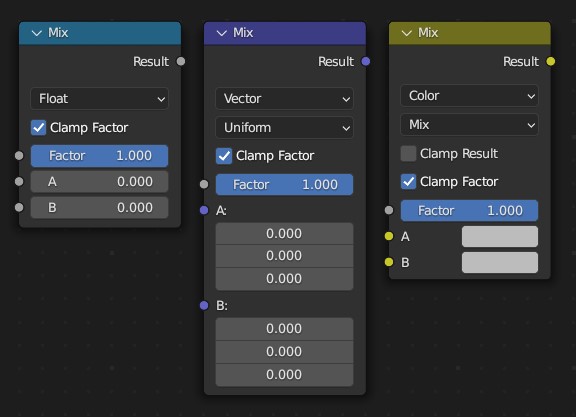
Đầu Vào (Inputs)
- Hệ Số (Factor)
Controls the amount of mixing between the
AandBinputs.- A/B
Hai đầu vào được hòa trộn với nhau.
Tính Chất [Properties]
- Kiểu Dữ Liệu (Data Type)
The Kiểu Dữ Liệu that được used cho/đối với mixing. The Nút supports Số Thật, Véctơ, Màu Sắc, và Xoay Chiều Kiểu Dữ Liệu.
- Chế Độ Hệ Số [duy Vector] (Factor Mode [Vector only])
Chế độ hệ số có thể được đặt thành "Đồng Đều/Nhất" và "Bất Đồng Đều". Trong chế độ đồng nhất, một đơn số thực sẽ điều khiển hệ số. Ở chế độ bất đồng nhất, một véctơ điều khiển hệ số cho từng kênh XYZ riêng biệt.
- Hòa Trộn [Duy màu sắc] (Mix [Color only])
Chúng ta có thể chọn các Chế Độ Pha Trộn trong trình đơn lựa chọn. Xin xem thêm về Color Blend Modes (Chế Độ Pha Trộn Màu Sắc) để biết thêm chi tiết về từng chế độ hoà trộn một.
Cộng, Khấu Trừ, Nhân, Màn Hình, Chia, Hiệu, Làm Tối, Làm Sáng, Lồng, Né Tránh Màu, Đốt Màu, Sắc Màu, Độ Bão Hòa, Giá Trị, Color, Ánh Sáng Mềm Mại, Ánh Sáng Tuyến Tính
- Hạn Định Hệ Số (Clamp Factor)
Giới hạn giá trị hệ số trong khoảng từ 0.0 đến 1.0. Nếu tùy chọn này không được chọn thì nút sẽ hoạt động bằng cách sử dụng "Ngoại Suy".
- Hạn Định Kết Quả [Duy màu sắc] (Clamp Result [Color only])
Giới hạn Kết Quả trong phạm vi giữa 0.0 và 1.0.
Đầu Ra (Outputs)
- Kết Quả (Result)
Xuất kết quả hòa trộn sử dụng kiểu dữ liệu đã chọn.
Một Số Ví Dụ (Examples)
Below are examples of blending modes, as well as some practical use cases.

Blending a colored pattern with a flat color (top row) and a circular mask (bottom row).
Fixing overexposure
The Compositing setup below shows how to fix an overexposed render by darkening it and increasing contrast.

Ví Dụ nút sắp đặt showing hai Đường Cong RGB nút và một Hòa Trộn nút cho/đối với tổng hợp.
The top Đường Cong RGB (RGB Curves Node) darkens the image by linearly scaling each color value to a smaller one.
The bottom curve node increases contrast by making small values smaller and large values larger.
Finally, the Mix node blends the two together.
Hình Ảnh Thủy Ấn (Watermark Images)
In the old days, a pattern was pressed into the paper mush as it dried, creating a mark that identified who made the paper and where it came from. The mark was barely perceptible except in just the right light. Probably the first form of subliminal advertising.
Nowadays, people watermark their images to identify them as personal intellectual property, for subliminal advertising of the author or hosting service, or simply to track their image's proliferation throughout the web.
Blender provides a complete set of tools for you to both encode your watermark and to tell if an image has your watermark.
Mã hóa Thủy Ấn của bạn trong một hình ảnh (Encoding your Watermark in an Image)
First, construct your own personal watermark. You can use your name, a word, or a shape or image not easily replicated. While neutral gray works best using the encoding method suggested, you are free to use other colors or patterns. It can be a single pixel or a whole gradient; it is up to you.
In the example below, we are encoding the watermark in a specific location in the image using the Translate node; this helps later because we only have to look at a specific location for the mark. We then use the RGB to BW node to convert the color image to grayscale numbers, which we then feed into the Map Range node to reduce the mark to one-tenth of its original intensity.
The Add node (Mix node with blending mode Add) adds the corresponding pixels, making the ones containing the mark ever-so-slightly brighter.

Nhúng một thủy ấn vào/trong một hình ảnh.
Tất nhiên, nếu bạn "muốn" mọi người chú ý đến nhãn hiệu của bạn thì đừng phóng to nó quá nhiều, hoặc làm cho nó có màu tương phản. Còn có rất nhiều phương pháp nữa, bằng phương pháp sử dụng các bố trí hòa trộn đổi khác biệt và dùng những Giàn Điều Khiển bạo dạn hơn. Hãy tùy ý thử nghiệm!
Giải mã một Hình Ảnh để tìm Thủy Ấn của bạn (Decoding an Image for your Watermark)
When you see an image that you think might be yours, use the node tree below to compare it to your stock image (non-watermarked original). In this tree, the Mix node is set to Difference, and the Map Value node amplifies any difference. You can see how the original mark clearly stands out.

Kiểm tra thủy ấn trong hình ảnh của bạn.