Mỹ Thuật Đường Nét (Line Art)
Tham Chiếu [Reference]
- Chế Độ [Mode]:
Chế Độ Đối Tượng [Object Mode]
- Panel (Bảng):
The Line Art panel is used to enable extra display options for customizing Line Art rendering for a specific object.
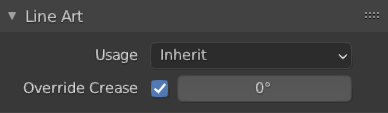
Bảng điều khiển Mỹ Thuật Đường Nét.
- Cách Dùng [Usage]
How the object is loaded into Line Art. This property overrides the parent collection's Mỹ Thuật Đường Nét (Line Art) usage.
- Thừa Kế (Inherit):
No special loading strategy for Line Art. Loading of the object is controlled by parent collection's Line Art settings.
- Bao Gồm [Include]:
Force include the object into Line Art calculation even if its parent collection specifies otherwise.
- Duy Giao Cắt (Intersection Only):
Đối tượng sẽ chỉ tạo ra các đường giao cắt trong cảnh và hình học của chính bản thân nó sẽ không nhìn thấy được.
- Duy Che Khuất (Occlusion Only):
Đối tượng sẽ chỉ gây ra sự che khuất đối với các đường nét hình dạng hiện có và hình học của nó sẽ không nhìn thấy được.
- Loại Trừ (Exclude):
The object will not be loaded into Line Art at all.
- Không Giao Cắt (No Intersection):
Đối tượng sẽ không tạo ra các đường giao cắt trên chính bản thân nó hoặc với các đối tượng khác trong cảnh.
- Ép Buộc Giao Cắt (Force Intersection):
Sinh tạo các đường giao cắt nhau, ngay cả đối với các đối tượng đã tắt tùy chọn giao cắt nhau nữa.
- Vượt Quyền Nếp Gấp (Override Crease)
Allows the object to have a different crease value than the global one set in the Line Art modifier.
- Crease (Nếp Gấp)
Vượt quyền giá trị nếp gấp cho đối tượng.
- Mức Độ Ưu Tiên Giao Cắt (Intersection Priority)
Assigns an intersection priority value for this object. The intersection line will be included into the object with the higher intersection priority value.