Bước Trung Gian (In-Betweens)
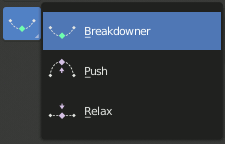
Công cụ về bước trung gian.
These tools create a new pose which is based on the keys surrounding the current frame. This can help to quickly build up in-betweens from already existing key poses.
Blend Pose with Rest Pose
Tham Chiếu [Reference]
- Chế Độ [Mode]:
Pose Mode and Object Mode
- Trình Đơn [Menu]:
- Trình Đơn [Menu]:
Blend with Rest Pose linearly interpolates the current pose to the rest position. When blending with a negative factor, the pose is moved away from the rest position. Only one keyframe is needed for this tool unlike two for the other.
Cường Điệu Tư Thế từ Dáng Phân Tích (Push Pose from Breakdown)
Tham Chiếu [Reference]
- Chế Độ [Mode]:
Pose Mode and Object Mode
- Công Cụ (Tool):
- Trình Đơn [Menu]:
- Trình Đơn [Menu]:
- Tổ Hợp Phím Tắt [Shortcut]:
Ctrl-E
Push Pose interpolates the current pose away from the linear interpolation between the surrounding keys. On your current frame, imagine a pose that is linearly interpolated from the surrounding keys. That is the base pose that this tool interpolates away from.
Thả Lỏng về Tư Thế Phân Tích (Relax Pose to Breakdown)
Tham Chiếu [Reference]
- Chế Độ [Mode]:
Pose Mode and Object Mode
- Công Cụ (Tool):
- Trình Đơn [Menu]:
- Trình Đơn [Menu]:
- Tổ Hợp Phím Tắt [Shortcut]:
Alt-E
Relax Pose is the opposite of Push Pose from Breakdown. Hence at full influence, the resulting pose will be identical to a linear interpolation between the surrounding keys.
Máy Phân Tích Tư Thế (Pose Breakdowner)
Tham Chiếu [Reference]
- Chế Độ [Mode]:
Pose Mode and Object Mode
- Công Cụ (Tool):
- Trình Đơn [Menu]:
- Trình Đơn [Menu]:
- Tổ Hợp Phím Tắt [Shortcut]:
Shift-E
Creates a suitable breakdown pose on the current frame.
The Breakdowner tool can be constrained to work on specific transforms and axes, by pressing the following keys while the tool is active:
G, R, S: move, rotate, scale
B: Bendy bones
C: custom properties
X, Y, Z: to the corresponding axes
Pha Trộn với Lân Cận (Blend to Neighbor)
Tham Chiếu [Reference]
- Chế Độ [Mode]:
Pose Mode and Object Mode
- Trình Đơn [Menu]:
- Trình Đơn [Menu]:
- Tổ Hợp Phím Tắt [Shortcut]:
Shift-Alt-E
Transitions the current pose with the neighboring keyframes in the timeline. In order for this operator to work, there must be a keyframe before and after the current frame.