Biến Hóa [Transform]
In Pose Mode, bones are transformed similarly to objects in Object Mode. The standard transform operators (Move, Rotate, Scale, and others) are available from , but they operate within the armature's hierarchy and each bone's local space.
Bone Parenting
Bone transformations are evaluated relative to the armature's rest pose and are affected by bone parenting. Transforming a parent bone also affects all of its children.
Transform Center
The default pivot point for a single selected bone is its root.
When multiple bones are selected, most pivot point modes use the median point of the selection. The 3D Cursor pivot instead uses the position of the 3D Cursor.
Local Space (Không Gian Cục Bộ)
In the armature's rest pose, every bone has a location and rotation of zero and
a scale of 1.0. Transformations in Pose Mode are applied relative to this
rest pose using each bone's own local coordinate system.
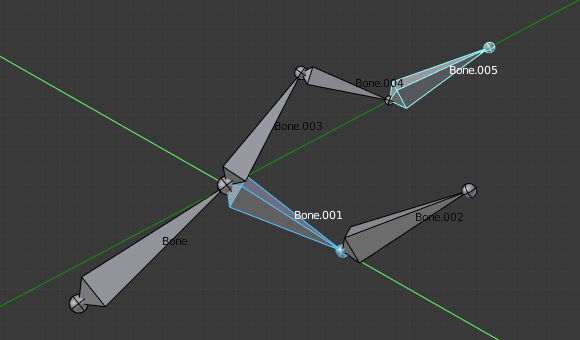
A rotation constrained to the local Y axis with two bones selected.
The displayed local axes are drawn relative to the armature's origin, while each bone is transformed in its own local space.
Using local axis constraints allows each selected bone to rotate around its own axes independently. For example, pressing R Y Y rotates the selected bones around their individual local Y axes, making it easy to twist multiple bones at the same time.
Canh theo Định Hướng Biến Hóa (Align to Transform Orientation)
Tham Chiếu [Reference]
- Chế Độ [Mode]:
Pose Mode (Chế Độ Tư Thế)
- Trình Đơn [Menu]:
The Align to Transform Orientation operator rotates the selected elements so their local orientation matches the active Transform Orientation.
The active transform orientation can be selected from the Transform Orientation popover in the 3D Viewport header or in the Orientation option of the