Выделить связанные (select linked)
Связанные (linked)
Ссылка
- Режим (mode):
Режим редактирования (edit mode)
- Меню:
- Горячая клавиша:
Ctrl-L
Selects all the geometry that’s connected directly or indirectly to the current selection. This is often useful when a mesh has disconnected but overlapping parts, where isolating them any other way would be tedious.
Instead of selecting an element and pressing Ctrl-L, it’s also possible to simply hover the mouse over an element and press L. Alternatively, press Shift-L to deselect.
The Настроить последнюю операцию (adjust last operation) panel has the following option:
- Разграничитель (delimit)
Stop expanding the selection when it reaches certain boundaries. It’s possible to activate multiple of these choices by clicking them with Shift-LMB.
- Нормаль (normal):
Stop at faces that have an opposite orientation.
- Материал (material):
Stop at faces that have a different material.
- Шов (seam):
Stop at edges that are marked as UV Seams.
- Острые (sharp):
Stop at edges that are marked as Sharp.
- UV (UVs):
Stop at island borders in any UV map.
Кратчайший путь (shortest path)
Ссылка
- Режим (mode):
Режим редактирования (edit mode)
- Меню:
- Горячая клавиша:
Ctrl-ЛКМ
Selects the geometry along the shortest path between the two most recently selected mesh elements.
To use the shortcut, first select the starting element normally, then select the destination element with Ctrl-LMB.
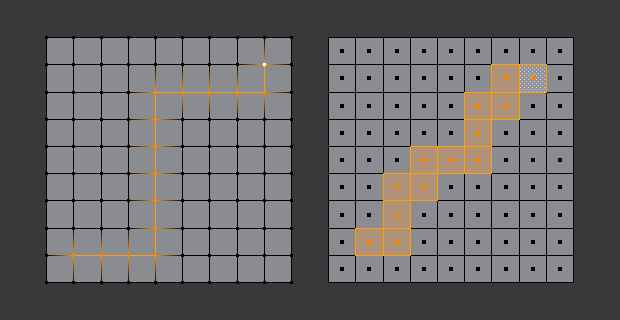
Shortest paths for vertices (left) and faces (right).
Опции (options)
- Edge Tag Edge Mode
Позволяет установить то, что следует делать с выделенными рёбрами:
- Выделить (select):
Simply select the edges.
- Метка шва (tag seam):
Mark the edges as UV Seams.
- Метка острого ребра (tag sharp):
Mark the edges as Sharp.
- Метка складки (tag crease):
Give the edges a Crease value of 1.0.
- Метка фаски (tag bevel):
Give the edges a Bevel Weight of 1.0.
- Метка ребра Freestyle (tag Freestyle edge mark):
Mark the edges as Freestyle edges.
- Шаг граней (face stepping)
Allow diagonal paths for vertices and faces, and edge rings for edges.
- Расстояние по топологии (topology distance)
Pick the path that crosses the least edges instead of the smallest distance.
- Залить область (fill region) Shift-Ctrl-ЛКМ
Select all possible shortest paths instead of just one.
- Deselected, Selected, Offset
Options for selecting a «dashed line» of elements instead of a continuous one. The path will contain a repeating pattern of a few unselected items followed by a few selected ones. See also Шахматное снятие выделения (checker deselect).
Связанные плоские грани (linked flat faces)
Ссылка
- Режим (mode):
Режим редактирования (edit mode)
- Меню:
Grows the selection to include connected faces until a sharp corner is reached.
- Острогранность (sharpness)
The maximum allowed angle between two faces for them to be considered part of the same flat surface. This angle is measured between the face normals, meaning that coplanar faces have an angle of 0° (not 180°) and sharp corners have a greater angle than dull ones (not smaller).


To stop the selection at edges that were manually marked as Sharp, use Связанные (linked) instead.