反向运动学约束
The Inverse Kinematics constraint makes not just one bone, but a whole chain of bones rotate to follow a target. A common example is automatically rotating the bones in a character's arm to achieve a desired hand position. See Inverse Kinematics for details.
The constraint can be added quickly using the shortcut Shift-I. See 为骨骼添加 IK.
Note
IK约束是很特殊的约束,因为它们修改了多个骨骼。出于这个原因,他们忽略了他们在堆栈中的位置,并且总是在受影响的骨骼上的所有其他约束之后运行。要在IK之后应用约束,必须首先将最终转换复制到新的骨骼链,例如,使用 复制形变约束。
选项
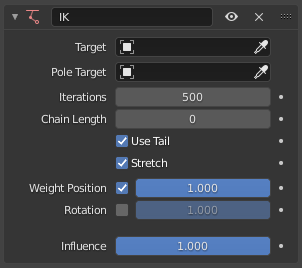
反向运动学约束。
- 目标
The object or bone which the IK chain should point towards.
Tip
Unlike other constraints which require a valid Target, the Inverse Kinematics constraint can work without one. In this case, the "chain tip" bone can be moved and rotated freely, and only its ancestors will be constrained.
- 极向目标
The object or bone that determines the roll of the IK chain. For example, when applying IK to a character's arm and using the Target to determine the position of the hand, the Pole Target determines the rotation of the arm, or put differently, the position of the elbow.
- 迭代
最大解算迭代次数。
- 链长
The number of bones affected by the constraint, starting with the owner bone and walking up its chain of ancestors. A value of 1 will only rotate the bone itself, a value of 2 will rotate the bone and its parent, and so on.
A value of 0 will include all of the bone's ancestors (up to the root).
- 使用尾部
Use the bone's tail as the end of the chain. Unchecking this will use the bone's head instead.
- 拉伸
Whether bones are allowed to scale up or down in order to reach the Target. This only applies to bones with an IK 拉伸 value that's greater than 0.
- 权重 位置
The checkbox determines whether the end of the chain should (try to) match the position of the Target.
The slider determines how strongly this chain affects its bones, compared to other IK chains that affect those same bones. This kind of structure is called a "tree", likening the chain tip bones to branches and their shared parents to a trunk. If a branch bone has a Weight of 1, it will "pull" on the trunk twice as hard as a branch with a Weight of 0.5.
- 旋转
The checkbox determines whether the end of the chain should match the rotation of the Target.
The slider determines how strongly this chain affects its bones, compared to other IK chains that affect those same bones.
- 影响
How strongly the constraint affects the bone.
iTaSC 解算器
If the armature is configured to use the iTaSC IK Solver, the constraint has the following additional parameters:
- IK 类型
- 复制姿态:
Just as with the Standard IK solver, the chain tip matches the location and/or rotation of the Target.
- 参照轴
The meaning of the axes in the Lock settings below.
- 骨骼:
The chain tip should be positioned (or rotated) so that the Target has an X/Y/Z coordinate (or angle) of 0 in the space of the bone.
- 目标:
The chain tip should be positioned (or rotated) so that it has an X/Y/Z coordinate (or angle) of 0 in the space of the Target.
- 锁定位置/旋转 X/Y/Z
Whether the chain tip is constrained to match the Target along each axis.
Note
Despite their name, these settings do not lock the bones to a fixed pose. For that, see the 锁定 settings in the bones' Inverse Kinematics properties.
- :距离:
The end of the chain stays inside, on the surface of, or outside a sphere centered on the Target.
- 极限模式
- 向内:
The chain tip stays close to the target.
- 向外:
The chain tip stays away from the target.
- 表面:
The chain tip stays at an exact distance from the target.
- 距离
The distance to maintain.