函数曲线修改器
参考
- 面板:
函数曲线修改器与物体修改器类似,它们添加的都是非破坏性效果,这些效果可随时调整,并能分层叠加以创造更复杂的效果。
修改器从上到下依次解算。您可以通过拖动其右上角的圆点来改变它们的顺序。
某些修改器要求独占使用,不可同时启用。目前包括循环以及平滑(高斯)修改器。
界面
- 名称
默认情况下,修改器会根据其功能命名,但此名称可以更改。
- 屏蔽
点击修改器标题中的复选框可禁用该修改器。
- 删除
点击修改器标题中的叉号即可删除该修改器。
- 影响
允许您在原始曲线和修改后的曲线之间进行混合。
- 限定帧范围
- 起始/结束
修改器效果开始/结束的帧。
- 淡入/淡出
相对于上述起始/结束值,修改器实现淡入/淡出效果所需的帧数。
添加修改器
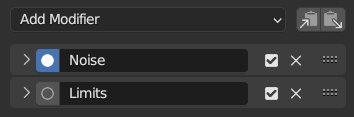
修改器面板。
函数曲线修改器可以通过多种方式添加。既可以通过曲线编辑器中的通道菜单,也可以通过通道区块的上下文菜单(在通道区块内右键单击),此外,还可以在侧栏的 修改器 卡中进行添加和管理。
要添加修改器,请先选择一条函数曲线(在通道区块中选择,或通过选中其某个关键帧),然后从菜单中选择 添加函数曲线修改器,或点击侧栏中的 添加修改器 下拉菜单。这样您就可以选择要添加到所选函数曲线上的修改器类型。
删除函数曲线修改器
与添加函数曲线修改器一样,移除它们也有多种方法。要移除单个修改器,只需点击侧栏中该修改器旁边的 X 图标即可。要一次性移除多个修改器,可以使用 删除函数曲线修改器 操作。
该选项可在通道菜单或通道区块的右键菜单中找到(在通道区块内右键单击)。选择此菜单选项后,您可以打开重做面板,根据需要调整设置。

重做面板
- 模式
用于从所选曲线中移除函数曲线修改器的方法。
- 移除全部:
这将删除所选曲线上的所有函数曲线修改器(默认选项)。
- 移除类型:
仅从选中的曲线中移除特定类型的修改器,其他修改器保持不变。
- 移除首个:
移除选定曲线中位于堆栈顶部的修改器。
- 类型
指定要移除的修改器类型(仅当模式设置为 “移除类型” 时,此选项才会显示)。
修改器的类型
生成器修改器
创建多项式函数。这些是基本的数学公式,根据所用的数值,可以表示直线、抛物线以及其他更复杂的曲线。
See also
请参阅维基百科页面以获取有关多项式的更多信息。
- 模式
用于表示方程的方法。
- 扩展多项式:
公式形式 \(y = A + Bx^1 + Cx^2 + ... + Dx^n\).
- 已分解多项式:
公式形式 \(y = (Ax + B)(Cx + D)\).
- 添加
将多项式添加到曲线上,而不是替换它。
- 排序
该多项式中
x的最高次幂。- 常值
方程中的常数 A、B、C……
内建函数修改器
这些是额外的公式,每个公式都有相同的选项来控制它们的形状。有关每个功能的更多详细信息,请参阅数学参考:
封套修改器
Lets you reshape the curve. First, you define an envelope, which consists of two horizontal lines that more or less match the curve's lower and upper bounds. Then, you add control points, where each point can push, squeeze, and stretch the envelope (and the curve along with it) at a certain frame.
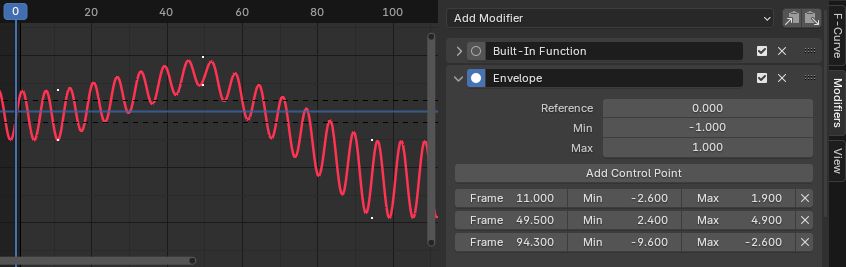
封套修改器。
- 参考
The value which the envelope is centered around.
- 最小/最大
The offset from the reference value to the envelope's initial lower/upper bound.
- 添加控制点
Adds a control point at the current frame.
- 点
- 帧
控制点的帧号。
- 最小/最大
The offset from the reference value to the envelope's adjusted lower/upper bound at this frame.
循环修改器
使曲线循环重复。
- 之前/之后模式
- 无循环
Do not repeat the curve before/after the original.
- 重复运动
Repeats the curve, keeping the values of each copy the same.
- 带偏移重复
Repeats the curve, offsetting each copy vertically so that its first keyframe matches the previous last keyframe.
- 重复镜像部分
Repeats the curve, flipping every other copy horizontally.
- 数量
The number of copies to create. A value of 0 means infinite.
简单循环曲线
当两端的 循环模式 设置为 重复运动 或 重复偏移,并且修改器的其他选项没有从默认值更改时,它定义了一个简单的无限循环。
这个特殊情况得到了 Blender 其他领域的一些额外支持:
自动贝塞尔控制柄放置可识别循环并进行调整以实现平滑过渡。
可以启用循环感知插帧选项,以在插入新关键帧时考虑循环。
噪波修改器
Modifies the curve with a noise formula. This is useful for adding subtle or extreme randomness to animated movements, like camera shake.
- 混合类型
- 替换:
Adds noise in the range [-0.5, 0.5].
- 相加:
Adds noise in the range [0, 1].
- 相减:
Subtracts noise in the range [0, 1].
- 正片叠底(相乘):
Multiplies by noise in the range [0, 1].
- 缩放
Changes the horizontal scale of the noise. Higher values make for less dense oscillation.
- 强度
Changes the vertical scale of the noise.
- 偏移
时间上偏移噪波。
- 相位
调整噪波的随机种子。
- 深度
调整噪波功能的详细程度。
- 间隙度
Gap between successive frequencies. Depth has to be greater than 0 for this to have an effect.
- 粗糙度
The amount of high frequency detail. Depth has to be greater than 0 for this to have an effect.
限制修改器
Limits the curve to specific time and value ranges.
- X 最小值/最大值
Removes the original curve data to the left of the minimum frame and to the right of the maximum, replacing it by Constant extrapolation.
- Y 最小值/最大值
Clamps the curve values, never letting them go below the minimum or above the maximum.
步进插值修改器
Gives the curve a stepped appearance by sampling it every N frames and making it hold its value after each sample. In a sense, this lowers the curve's frame rate by letting it change its value less frequently, producing choppy movement as a result.
- 步长尺寸
The number of frames to hold each step.
- 偏移
The number of frames to offset the sample points.
- 起始帧
The frame where to start applying the effect.
- 结束帧
The frame where to stop applying the effect.
平滑(高斯)修改器
Uses Gaussian smoothing to reduce detail and noise in the curve. It performs the same smoothing as the Smoothing Operator.
This uses linear interpolation for subframes which can introduce issues related to motion blur.
Note that this can be a resource-heavy modifier, and its effect on performance can become noticeable when used on many F-Curves.
Note
The Smooth (Gaussian) modifier has to be the first modifier in the list.
This modifier needs to know exactly where the keyframes are located, which is not possible when other modifiers are processed first. This means this modifier is not compatible with the Cycles Modifier.
- 西格玛
The shape of the Gaussian distribution in frames. Lower values will increase sharpness, reducing the smoothing effect. Larger values will result in more smoothing, but are limited by the Filter Width (see below).
- 过滤宽度
The number of frames the filter "sees" around each keyframe. Higher values allow more smoothing (larger Sigma can then smooth over more frames), but this will decrease performance.