变换
参考
- 模式:
物体模式
- 面板:
- 面板:
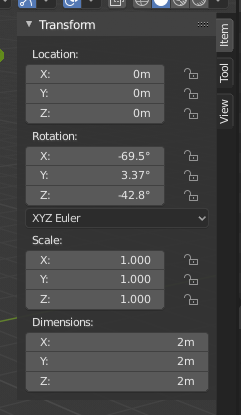
变换属性。
侧栏区块中的 变换 面板,允许在 物体模式 中,查看和手动/数字控制物体的位置、旋转和其它属性。每个物体存储其位置、方向和缩放值。这些可能需要数字地操作、重置,或应用。在 编辑模式 中,它主要允许为一个顶点或一组顶点(包括边/面)的质心点,输入精确坐标。由于每种类型的物体,在 编辑模式 下的 变换 面板中,都有一组不同的选项,参见制作模型一章中的说明。
此面板用于编辑或显示物体的变换属性,如位置、旋转和/或缩放。这些字段更改物体的原点,进而影响其所有 顶点 和面的所有方面。
- 位置
物体在局部坐标中的原点位置。
- 旋转
物体的局部方向,相对于全局轴及其自身的原点。
- 旋转模式
可以在手册附录找到计算旋转的方法的其他信息。
- 缩放
物体沿局部轴缩放(即 缩放 X 值表示沿局部 X 轴缩放)。每个物体(立方体、球体等),创建时,在每个局部方向具有一个单位。若要使物体更大或更小,在所需要的轴上缩放它。
- 维度
物体边界框的大小(与局部坐标轴对齐 —— 想象一个刚好足以容纳物体的纸板盒)。
- 变换属性锁定
当切换被锁定时,在任何交互操作中都不能改变相应的变换值。但是,使用非交互式操作方式仍然可以更改该值,例如编辑相应的数字字段或使用 Python.
例如,如果锁定了 位置 X 的属性,则无法使用 3D 操控器沿着全局 X 轴移动物体。但是,仍然可以使用 位置 X 数值字段来平移。可以将锁定特性看作只能从面板更改的刚性约束。
要锁定属性,请点击按钮旁边的挂锁图标。如果图标显示的是打开的挂锁,则按钮已解锁;如果图标显示的是关闭的挂锁,则按钮已锁定。
增量变换
参考
- 模式:
物体模式
- 面板:
增量变换只是在上述变换之上应用的简单变换。增量变换在动画中特别有用。例如,您可以使用基本变换动画化物体,然后使用增量变换移动它们。
父级逆变换
参考
- 模式:
物体模式
- 面板:
- 上下文:
Available when the selected object is parented by another object.
The Parent Inverse transform defines how the child object's local space is offset relative to its parent. It ensures that when parenting is created, the child keeps its current world position, even though it now inherits transforms from the parent.
The matrix is displayed decomposed into Location, Rotation, and Scale values. These represent the offset needed to maintain the child's position relative to its parent. The values are read-only and shown for inspection only.
The Rotation Mode determines how the rotation component is displayed, and can be switched between systems such as XYZ Euler, Axis Angle, or Quaternion. This behaves identically to the 旋转模式 selector used in the main transform panel.
清除父级逆变换
Clears the Parent Inverse matrix from the selected objects. With an empty matrix, the location, rotation, and scale properties of the children are interpreted directly in the coordinate space of the parent.
This effectively makes the child's transforms relative to the parent's origin, potentially moving the object in world space.
See 清空父级 for additional methods to clear or manage parent-child relationships.