混合着色器
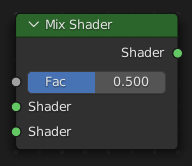
The Mix Shader node blends between two shaders based on a Factor value. When Factor is 0.0, only the first shader is visible; at 1.0, only the second. Values between produce a blend of both.
This node is the central hub for most material layering workflows — it is used with the Fresnel or Layer Weight nodes to create angle-dependent materials (plastic coatings, glass, edge effects), with textures to mix surface details, or with vertex colors and masks for game-ready assets.
For mixing colors rather than shaders, use the Mix Node instead.
输入
- 着色器
Standard shader input. The node provides two shader inputs: the top socket is the first shader (visible when Factor is 0.0), the bottom socket is the second shader (visible when Factor is 1.0).
- 系数
Blend weight in the range 0.0 to 1.0. Controls the visibility of each shader: 0.0 shows only the first shader, 1.0 shows only the second. Typically driven by a Fresnel, Layer Weight, texture, or vertex color node.
属性
该节点没有属性。
输出
- 着色器
Standard shader output. Connect this to the Surface input of a Material Output node.
示例

将光泽和漫反射着色器混合在一起,可以制作出漂亮的陶瓷材质。
Common Factor Sources
The Factor input can be driven by many different nodes, each producing a different visual result:
Fresnel — creates angle-dependent mixing where the second shader dominates at grazing angles. Ideal for glossy coatings and glass.
Layer Weight — offers both Fresnel (IOR-based) and Facing (geometric) weight outputs with a simpler 0.0–1.0 input range.
Image Texture or Noise Texture — drives the mix with grayscale values, creating textured transitions or procedural wear effects.
Vertex Color or Attribute — enables per-vertex control of material blending, commonly used in game assets for terrain blending or damage maps.
Mixing shaders can increase render noise compared to a single shader because Cycles uses the Factor to probabilistically select which shader to evaluate for each ray. For simple color blending (e.g. combining two colors for the same roughness), use a Mix Node to blend colors before feeding them into a single BSDF — this is often more efficient and produces less noise.