标题栏
每种约束在顶部都有一个标题:
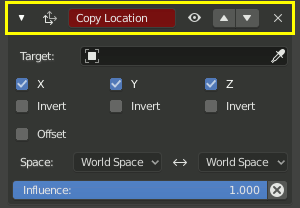
约束标题栏
- / 扩展/折叠
显示或隐藏约束的设置。折叠的约束仍然有效。
- 图标
表示约束类型图标。如果此图标为红色,则表示一个或多个设置未正确填写,该约束没有效果。
- 名称
Initially this is simply the constraint type, but it can be customized to something more specific.
- 开启
启用或禁用约束。禁用约束会关闭其效果,但会保留其设置以备将来使用。
Another way of disabling a constraint is to set its Influence to zero. Unlike the Enabled setting, this can be animated.
- 其他项
- 应用 Ctrl-A
将约束的结果应用到物体/骨骼自身的变换,然后删除该约束。
Warning
Applying a constraint that is not first in the stack will ignore the constraints before it, which may produce undesired results.
See also
Apply Visual Transform to apply the combined result of all constraints without deleting them.
- 复制 Shift-D
在当前约束的下方创建该约束的副本。
- 复制到选定项
将活动物体中的约束复制到所有选定的物体。
- 移至首位/末尾
将约束移动到队列中的第一个或最后一个位置。
- 删除 X, Delete
从堆栈中删除约束。其设置将丢失,且不再影响物体/骨骼。
- 移动
拖动可以上下移动约束在堆栈中的位置。由于堆栈是按从上到下的顺序进行计算的,因此移动约束可能会显著影响最终结果。