物体解算约束
The Object Solver constraint makes a Blender object imitate the motion of a real-world object.
用法
Start by loading a video file into the Movie Clip Editor, registering the physical object in the 物体面板, and using motion tracking to track at least eight markers on that physical object. Then use 解算摄像机/物体运动 to reconstruct the motion of the physical object, and finally add this constraint to a Blender object.
选项
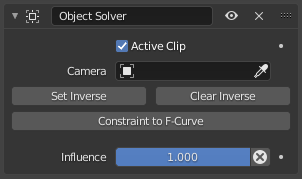
物体解算约束。
- 活动剪辑
Whether the physical object is in the scene's Active Clip. If unchecked, a selector appears for choosing another clip.
- 物体
The physical object whose motion to imitate. See the 物体面板 in the Movie Clip Editor's Sidebar for setting this up.
- 摄像机
The Blender camera matching the physical camera that recorded the object. If left empty, the scene's active camera is used.
If the physical camera was in motion, the Blender camera should have a 摄像机解算约束. This constraint is useful even if the physical camera was stationary, because it makes the tracking markers appear at their reconstructed world positions in the 3D Viewport (if the 运动追踪 overlay is enabled).
- 设置反向
Tell the constraint that the current Location of the Blender object (that is, its position with the constraint disabled) is the correct position for the current frame. Once this information is saved, the object will also be in the correct position for the other frames.
在最初添加约束时:
将物体置入当前帧的位置。
添加约束。
点击 设置反向。
在后续调整物体位置时:
运行应用可视变换。(这可能会将物体移至不同位置。)
禁用约束。(这将使物体恢复到先前位置。)
按需调整物体的位置。
点击 设置反向。
启用约束。
- 清除反向
重置由 设置反向 所存储的相对变换。
- 约束到函数曲线
用一组等效的关键帧替换约束。
- 影响
How strongly the constraint affects its owner.