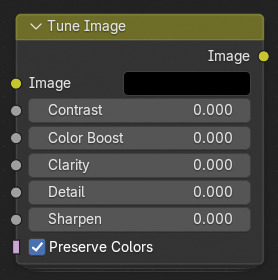
调整图像节点

调整图像节点。

The Tune Image node provides a quick and intuitive way to enhance an image's overall appearance by adjusting key visual parameters such as contrast, clarity, and sharpness. It is designed as a compact, all-in-one correction tool for fine-tuning rendered or composited images without requiring multiple separate nodes.

输入

图像

Standard color input image.

对比度

Adjusts the difference between light and dark areas. Increasing contrast deepens shadows and brightens highlights, while decreasing it flattens the image's tonal range.

色彩增强

Enhances the intensity of colors without oversaturating them. Useful for enriching dull or washed-out images.

清晰度

Emphasizes midtone contrast and local details, improving the sense of depth and definition.

细节

Adjusts the visibility of small-scale texture information. Higher values bring out fine details; lower values smooth them.

锐化

Increases edge definition by enhancing high-frequency detail. Useful for counteracting blur from downsampling or lens effects.

保留颜色

Maintains natural color balance when applying tonal adjustments. When disabled, contrast and clarity may shift the color hue or saturation.

输出

图像

The adjusted image with the applied tuning enhancements.