Restricción Apuntar
The Track To constraint makes an object or bone point towards a certain target, then roll to make a certain local axis point upwards. It’s typically called «Look At» or «Aim» in other 3D software.
If the constraint owner is almost directly above the target, the roll around the tracking axis will become unstable. For this scenario, it’s recommended to use the Restricción Apuntar (amortiguado) instead.
Opciones
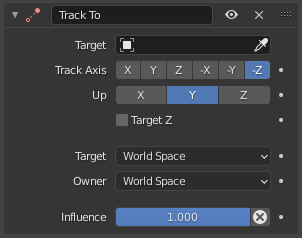
La restricción Apuntar.
- Objetivo
The object or bone to point towards.
- Apuntar eje
The local axis of the owner that should point at the target. For bones, this should typically be Y.
A negative axis will make the owner point away from the target instead.
- Arriba
The local axis of the owner that should point upwards in the world.
Importante
The Track Axis and the Up axis must be different. If they are the same, the constraint will stop working and its icon will turn red.
- Z del objetivo
Align the owner’s Up axis as closely as possible to the target’s Z axis instead of the global one.
- Objetivo/Propietario
The spaces for evaluating the target and owner transforms.
- Influencia
How strongly the constraint affects the owner.