Espacios de color
Flujo de trabajo lineal
Different Color Spaces are needed for rendering, display and storage of images.
Rendering and compositing is best done in a scene linear color space, which corresponds more closely to nature, and makes computations more physically accurate. Blender primarily works with scene linear colors for materials, lighting, geometry and compositing.
However, these values do not directly correspond to human perception or the way display devices work. Image files are also often stored in different color spaces for more efficient compression.
For a correct linear workflow, it is important to assign the correct color spaces for images and displays. Blender will then perform conversion to and from scene linear colors.
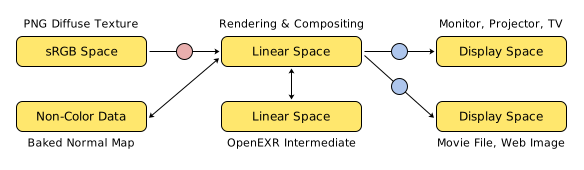
Ejemplo de un flujo de trabajo lineal.
Espacio de color de trabajo
Referencia
- Editor:
Propiedades
- Panel:
- Archivo
Color space used for all scene linear colors in this file, and for shader, compositing and geometry nodes processing. The default is Linear Rec.709, while Linear Rec.2020 and ACEScg are available for working with a wider gamut of colors and compatibility with ACES workflows.
The working space affects the colors of all data-blocks in a file, and has a significant effect on rendering and compositing results. Generally the working space should be chosen at the start of a project and used for all blend files.
Blender can convert between different working spaces, however this is only an approximation and manual fix-ups are typically needed. When linking and appending data-blocks, colors are automatically converted to match the current file.
- Editor de video
El espacio de color en el que operará el Editor de video. De forma predefinida, el Editor de video operará en el espacio sRGB, pero también será capaz de funcionar en un espacio Lineal (tal como lo hacen los nodos de composición), o en otros espacios distintos. Los diferentes espacios de color proporcionarán resultados también diferentes durante la corrección de color, fundidos cruzados y otras operaciones.
Los espacios de color soportados de forma predefinida se describen en detalle aquí: Espacios de color incorporados.
Imágenes y video
When working with image and video files, Blender will automatically try to guess the right color space. If this is not correct, the color space of the image file can be configured in the image settings.
A common situation where manual changes are needed is when working with or baking normal maps and displacement maps. Such maps do not actually store colors, just data encoded as colors. Those images should be marked as Non-Color Data.
For intermediate image files in production, it is recommended to use OpenEXR files. These are always stored in scene linear color spaces, with high precision to avoid data loss. That makes them suitable to store renders that can later be composited, color graded and converted to different output formats.
Espacios de color incorporados
El archivo de configuración OCIO de Blender está equipado de forma predefinida para leer y escribir archivos en estos espacios de color
Visualización
Espacios de color para pantallas y archivos de imagen.
- sRGB:
Espacio de visualización estándar sRGB que utiliza cromaticidades Rec. 709 y un punto de blanco D65.
- Rec.2020:
Visualización EOTF BT.2020 2.4 exponencial.
- Rec.1886:
Visualización EOTF BT.1886 2.4 exponencial, usada comúnmente en aparatos de TV.
- Display P3:
Display P3 de Apple con función de transferencia de codificación sRGB compuesta (por partes), común en dispositivos Mac.
- Rec.2100 PQ:
For high dynamic range images and video with Rec.2020 wide gamut, up to 10000 nits.
- Rec.2100 HLG:
For high dynamic range images and video with Rec.2020 wide gamut, up to 1000 nits.
Entrada
Color spaces to read images that are encoded in the native space of film cameras, without conversion in external software.
Includes color spaces for Apple, ARRI, Blackmagic Design, Canon and Sony cameras.
Lineal
Color spaces commonly used for OpenEXR files.
- Espacio de color de trabajo:
The linear working space of the current blend file, that is used by default in compositing, shader and geometry nodes.
- Rec.709 lineal:
Lineal con cromaticidades BT.709 y un punto de blanco D65.
- Rec.2020 lineal:
Lineal con cromaticidades BT.2020 y un punto de blanco D65.
- Linear Adobe RGB:
Linear Adobe RGB with illuminant D65 white point.
- ACEScg:
An ACES color space that is designed to be used for rendering and compositing. It uses the AP1 color primaries, a D60 white point, and a linear transfer function. The standard working space in ACES workflows.
- ACES2065-1:
An ACES color space using the AP0 color primaries, a D60 white point and a linear transfer function. This color space is meant to store and transfer data, preserving the most information possible. Commonly used for delivery and archival in ACES workflows.
- E-Gamut FilmLight lineal:
E-Gamut lineal con punto de blanco D65.
- DCI-P3 D65 lineal:
DCI-P3 lineal con punto de blanco D65.
- CIE-XYZ E lineal:
Estándar 1931 CIE XYZ con un punto de blanco asumido E.
- CIE-XYZ D65 lineal:
1931 CIE XYZ con punto de blanco D65 adaptado.
Log
- ACEScc:
Espacio de corrección ACES, usando primarios AP1.
- ACEScct:
ACES color correction space with toe, using AP1 primaries.
- AgX logarítmica:
Intermediate log color space of AgX view transform.
- Fílmica logarítmica:
Espacio de color logarítmico intermedio de la transformación de visualización Fílmica.
Utilitarios
Additional color spaces that images may commonly be stored in.
- Gamma 1.8 Encoded Rec.709:
1.8 gamma-encoded Rec.709 with illuminant D65 white point.
- Gamma 2.2 Encoded AP1:
2.2 gamma-encoded AP1 with ACES white point.
- Gamma 2.2 Encoded AdobeRGB:
2.2 gamma-encoded Adobe RGB (1998) with illuminant D65 white point.
- Gamma 2.2 Encoded Rec.709:
2.2 gamma-encoded Rec.709 with illuminant D65 white point.
- Gamma 2.4 Encoded Rec.709:
2.4 gamma-encoded Rec.709 with illuminant D65 white point.
- sRGB Encoded P3-D65:
sRGB-encoded P3-D65 with illuminant D65 white point.
- sRGB Encoded AP1:
sRGB-encoded AP1 with ACES white point.
View Inverse
Color spaces corresponding to view transforms. These color spaces can be used for background images that should not be affected by the view transform, while everything else in the scene is affected.
- ACES 1.3 sRGB:
Transformación de visualización ACES 1.3
- ACES 2.0 sRGB:
Transformación de visualización ACES 2.0
- AgX Base sRGB:
Transformación de visualización AgX
- Fílmica sRGB:
Transformación de visualización fílmica
- Khronos PBR Neutral sRGB:
Transformación de visualización Khronos PBR neutral
Otro
- Datos:
Generic data that is not color, will not apply any color transform (e.g. normal maps or displacement maps).
- Espacio de color de trabajo:
Uses the Archivo color space defined in the scene’s color management settings.