Restricción Acción
The Action constraint evaluates the location, rotation, and scale inside a certain Action at a certain frame, then applies those to an object or bone.
The frame can either be given directly, or it can be derived from a location coordinate, rotation angle, or scale factor of another object or bone. An example of the latter would be to use frame 0 of the Action if an Empty is at X = 0 and frame 100 if the Empty is at X = 10. If the Empty is then placed at X = 5, the constraint will interpolate this and evaluate frame 50.
Ver también
The Restricción Copiar transformaciones may be a sufficient replacement if the Action is very simple.
Drivers allow defining more complex mathematical relationships, again without setting up an Action.
An alternative (if obscure) way of using this constraint is to reference an Action that animates properties of other constraints. The Action constraint will then apply these properties to the constraints that come after it, as long as their names match the ones in the Action.
Opciones
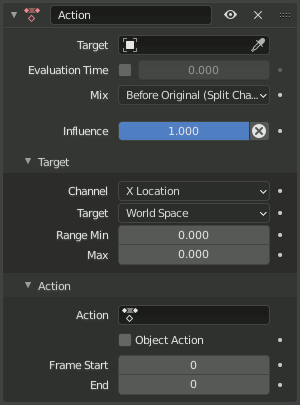
Restricción Acción.
- Objetivo
The object or bone to use for calculating the Action frame. Not needed if Evaluation Time is used.
- Tiempo de evaluación
Allows specifying the Action frame through a number rather than through a transform property of a Target. A value of 0 corresponds to Frame Start while 1 corresponds to Frame End (see below).
Like other properties, the Evaluation Time can be fixed, keyframed, or controlled by a Driver. The latter can further make use of Custom Properties.
- Mezclar
Specifies how the evaluated Action transformation is combined with the owner’s original transformation (from its preceding constraints).
- Reemplazar:
The Action’s transformation replaces the owner’s.
- Antes de la original (completa):
The Action’s transformation is applied before the owner’s. The result is the same as the owner’s transformation if it were a child of the Action and there was no constraint.
If the «parent» is non-uniformly scaled and the «child» was originally rotated, the constraint will cause shearing, just like the default Inherit Scale Full setting for bones.
- Antes de la original (alineada):
Prevents shearing by scaling the «child» along its own axes instead of the axes of the «parent,» just like the Inherit Scale Aligned setting for bones.
- Antes de la original (canales divididos):
Calculates each transform «channel» – location, rotation, and scale – separately from the others. The difference with Before Original (Aligned) is that the child’s location is only affected by the parent’s location, not by its rotation and scale.
- Después de la original (completa/alineada/canales divididos):
Like Before Original, except the result is the transformation of the Action if it were a child of the owner.
Ver también
The page of the Restricción Copiar transformaciones demonstrates the Mix modes with screenshots.
Advertencia
For technical reasons, modes other than After Original (Full) and After Original (Aligned) may not work as expected on objects (not bones) without a parent.
- Influencia
How strongly the constraint affects the owner.
Destino
- Canal
The transform property (location/rotation/scale) and axis to use for calculating the Action frame.
- Objetivo
The space in which to evaluate the above Channel.
- Rango Mín / Máx
The values of the Channel that correspond to Frame Start/End. Despite the names, Range Max is allowed to be less than Range Min.
Advertencia
Target rotations are «wrapped around» so they’re always in the range -180° to 180°.
Negative scales don’t work (they are treated as positive scales instead).
Acción
- Acción
La acción a ser usada.
Consejo
Actions can be stored as Assets for reuse. See Biblioteca de poses for details.
- Contenedor
The Slot inside the Action to use.
- Object Action Bone constraint only
By default, the constraint finds Action keyframes for a bone with the same name. Checking Object Action will use the Action’s object keyframes instead.
The opposite – applying a bone animation to a constrained object – is not supported. Neither is applying all bone animations in an Action to all bones in an Armature.
- Fotograma de Inicio/Fin
The frames within the Action that correspond to Range Min/Max. Frame End is allowed to be less than Frame Start – this will play the animation in reverse.