Split Toning Node
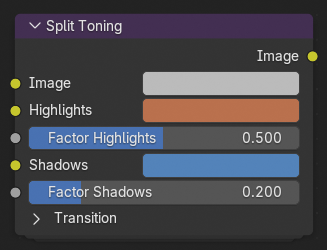
Split Toning applies different color tints to the highlights and shadows of an image. This technique is widely used in photography and color grading to create mood, enhance contrast, or stylize an image by giving distinct color tones to bright and dark regions.
For example, warm highlights and cool shadows can evoke a cinematic or nostalgic look, while complementary tones can create stylized or dramatic effects.
Entradas
- Imagen
Standard color input image.
- Luces
The color tint applied to the bright areas of the image.
- Factor Highlights
Controls how strongly the Highlights color affects the bright regions. A value of 0 disables the effect, while 1 applies it fully.
- Sombras
The color tint applied to the darker areas of the image.
- Factor Shadows
Controls the strength of the Shadows tint.
Transición
- Balance
Shifts the midpoint that defines what parts of the image are considered highlights or shadows. Increasing this value favors the highlight color; decreasing it favors the shadow color.
- Suavizado
Adjusts how gradually the image transitions between tinted shadows and highlights. Higher values create a smooth, natural blend; lower values make the transition more abrupt.
Salidas
- Imagen
The input image with the split toning effect applied.