Selecting Grease Pencil Elements
Modo de selección
Referencia
- Modo:
Modo Edición
- Menú:
- Atajo:
1, 2, 3

Edit Mode selection buttons.
In Edit Mode there are three different selection modes. You can enter the different modes by selecting one of the three buttons in the header.
- Puntos:
To select individual points.
- Trazos:
To select an entire stroke.
- Segmentos:
To select all points that are between other strokes.
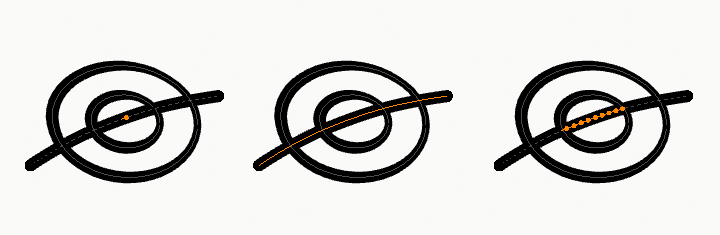
Points, stroke and in between stroke selection sample.
Todos/Ninguno/Invertir
All these options have the same meaning and behavior as in Object Mode.
Seleccionar aleatoriamente
Referencia
- Modo:
Modo Edición
- Menú:
Randomly selects unselected points or strokes.
- Proporción
The likelihood of an unselected elements being selected. Note that, this is not the percentage amount of elements that will be selected.
- Semilla aleatoria
Semilla usada por el generador numérico pseudo-aleatorio.
- Acción
Selection or deselection of elements.
Seleccionar alternativos
Referencia
- Modo:
Modo Edición
- Menú:
Selects alternate points in the selected strokes.
Seleccionar más / menos
Referencia
- Modo:
Modo Edición
- Menú:
- Atajo:
Ctrl-+ numérico, Ctrl-- numérico
El propósito de estos operadores es contraer o extender la selección actual dentro de un trazo (esto es, nunca «saldrán» fuera de un trazo o «saltarán» hasta otro trazo del mismo objeto).
- Más
For each selected point, select all its linked points (i.e. one or two…).
- Menor que
For each selected point, if all points linked to this point are selected, keep this one selected. Otherwise, deselect it.
Consejo
When all points of a stroke are selected, nothing will happen (as for Less, all linked points are always selected, and of course, More cannot add any). Conversely, the same goes when no points are selected.
By Stroke Type
Referencia
- Modo:
Modo Edición
- Menú:
Selects curves based on whether they are strokes or fills.
- Tipo
- Trazo:
Select all stroke curves (outlines).
- Rellenar (o Relleno):
Select all fill curves (enclosed filled shapes).
- Deseleccionar
If enabled, matching curves are deselected instead of selected.
Seleccionar similar
Referencia
- Modo:
Modo Edición
- Menú:
- Atajo:
Mayús-G
Seleccionará todos los trazos con características similares.
- Modo
The characteristics to compare.
- Capa:
Seleccionará todos los puntos/trazos con un identificador de capa similar.
- Material:
Seleccionará todos los puntos/trazos con un identificador de material similar.
- Color de vértices:
Seleccionará todos los puntos/trazos con un color de vértice similar.
- Radio:
Seleccionará todos los puntos/trazos con un radio de trazo similar.
- Opacidad:
Selects all the points/strokes with a similar layer opacity
- Umbral
Qué tan similar deberá ser la selección.
Select Fill
Referencia
- Modo:
Modo Edición
- Menú:
- Atajo:
Ctrl-L
Selects all curves that belong to the same fill region as the active curve.
Grease Pencil fills can be composed of multiple boundary curves. This operator expands the current selection to include all curves that define the same enclosed fill area.
This is useful when editing or transforming an entire filled shape, ensuring that all boundary strokes are selected together.
Seleccionar por vínculo
Referencia
- Modo:
Modo Edición
- Menú:
- Atajo:
L
Selects the stroke under the cursor along with all connected points belonging to the same stroke.
This is useful for quickly selecting an entire stroke for editing, transforming, moving between layers, or applying material changes.
- Deselect Linked
Removes the linked stroke under the cursor from the selection.
Atajo: Mayús-L
Seleccionar Primero/Último
Referencia
- Modo:
Modo Edición
- Menú:
These operators will toggle the selection of the first or last point(s) of the stroke(s) in the object. This is useful to quickly find the start of a stroke.