Restricción Cinemática inversa (curva)
The Spline IK constraint fits a chain of bones to the shape of a Curve. It’s particularly well suited for rigging flexible body parts such as tails, tentacles, and spines, as well as inorganic objects such as ropes.
Nota
La restricción de Cinemática inversa es especial, en el sentido de que modifica a varios huesos, más allá de ser aplicada a un hueso en particular. Por esta razón, ignorará su posición en la pila de restricciones y será ejecutada luego de todas las demás restricciones de los huesos afectados. Para lograr aplicar restricciones, luego del efecto de cinemática inversa, será necesario copiar primero la transformación final a una nueva cadena de huesos, (normalmente usando restricciones Copiar transformaciones.
Opciones
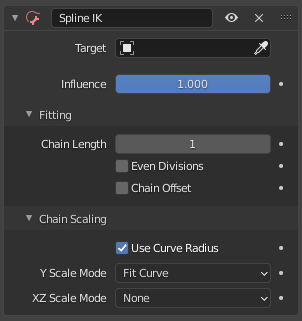
La restricción Cinemática inversa (curva).
- Objetivo
The Curve whose shape to match.
- Influencia
How strongly the constraint affects the bone chain.
Ajuste
- Longitud de cadena
The number of bones affected by the constraint, starting with the owner bone and walking up its chain of ancestors. A value of 1 will only fit the bone itself, a value of 2 will fit the bone and its parent, and so on.
- Even Divisions
When disabled, each bone will cover a distance along the curve relative to its rest length. When enabled, each bone will cover the same distance regardless of its rest length.
- Desplazar cadena
When disabled, the bone chain will move to match the position of the curve. When enabled, the bone chain will stay at its original starting location and mimic the shape of the curve from there.
Escala de la cadena
- Usar radio de curva
Whether to use the radii of the curve control points as additional X and Z scaling factors for the bones.
- Modo de escala Y
How to stretch the bones along the length of the curve.
- Ninguno:
Reset the bones to their rest length.
- Ajustar a curva:
Stretch the bones to cover the entire length of the curve.
- Original de los huesos:
Keep the bones” original length (including their Pose Mode scale).
- Modo de escala XZ
How to scale the bones along the normals of the curve (or in other words, how to determine the thickness of the bones).
- Ninguno:
Reset the bones” X and Z scales to 1.
- Original de los huesos:
Keep the bones” original X and Z scales from Pose Mode.
- Escala inversa:
Set the X and Z scales to the inverse of the Y scale.
- Preservar volumen:
Similar to the Stretch To constraint.
- Usar escala original
Apply Inverse Scale or Volume Preservation on top of the Pose Mode bone scales, like in the Stretch To constraint.
Ver también
This subject is seen in-depth in the Armature Posing section.