Nodo Repetir
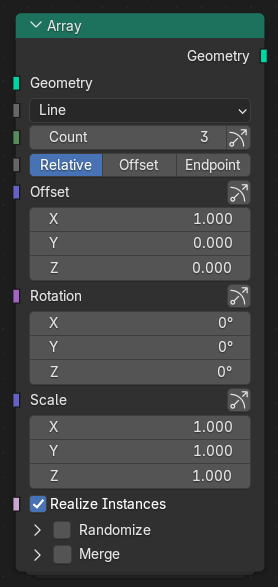
El nodo Repetir permitirá crear múltiples copias e una geometría de entrada y distribuirlas de forma lineal, circular o en forma personalizada. Ofrece opciones flexibles para controlar la cantidad, el espaciado y la aleatorización, permitiendo realizar una duplicación orgánica y precisa de geometría.
Entradas
- Geometría
La geometría a ser duplicada.
- Forma
Método utilizado para distribuir los duplicados.
- Línea:
Arranges copies along a straight line.
- Círculo:
Arranges copies around a circle.
- Curva:
Arranges copies along a curve input.
- Transformación:
Uses a transform offset or object transform to position each copy.
- Modo de desplazamiento Línea
Determines how copies are spaced along a line.
- Relativo:
Offsets each copy relative to the bounding box size of the geometry.
- Desplazamiento:
Offsets copies by a fixed world-space distance.
- Final:
Distributes copies evenly between start and end points.
- Desplazamiento Línea Relativo
The amount to move each copy relative to its bounding box size when using Relative mode.
- Método de generación Círculo Curva
Determinará la forma en que se definirá la cantidad de duplicados.
- Cantidad:
Sets a fixed number of copies.
- Distancia:
Sets copies based on distance between them.
- Cantidad Círculo Curva Cantidad
The number of copies to generate.
- Distancia angular Círculo Distancia
The angular distance between copies when using Circle shape.
- Eje central Círculo
The axis used as the up direction for circular arrangements.
- Segmento del círculo Círculo
Determines whether the copies form a full circle or just a partial arc.
- Completo:
Copies are evenly spaced around a full 360° circle.
- Arco:
Copies fan out along a circular arc.
- Radio Círculo
The radius of the circle along which the copies are distributed.
- Ángulo de barrido Círculo Arco
The total angle (in radians or degrees) spanned by the arc when Circle Segment is set to Arc.
- Por curva Curva
Specify the number of copies for each curve separately.
- Objeto curva Curva
Reference curve object for array.
- Referencia transformación Transformación
Defines how the transform is applied for Transform shape.
- Entrada:
Uses the transform specified directly in the node inputs.
- Objeto:
Uses the transform of a specified object as the reference.
- Traslación Entradas Línea Desplazamiento Final
The positional offset applied to each copy.
- Rotación Entradas Línea
The rotation offset applied per copy.
- Escala Entradas Línea
The scale factor applied per copy.
- Objeto transformación Transformación Objeto
The object whose transform is used when Transform Reference is set to Object.
- Espacio relativo Transformación Objeto
Determines whether the transform is applied in object or world space.
- Convertir instancias en reales
Converts the generated instances into real geometry. This must be enabled for certain operations such as merging or boolean operations.
Alinear rotación Círculo Curva
Automatically aligns the rotation of instances to follow the direction of the array distribution.
For Circle, instances are aligned tangentially around the circle while adapting their base orientation to the selected Central Axis.
For Curve, instances are aligned to the curve tangent and orientation, allowing geometry to naturally follow the shape of the curve.
When disabled, all instances keep the original rotation of the input geometry.
- Local Rotation X, Y, Z
Additional local rotation offsets applied after automatic alignment.
This is useful for correcting the orientation of geometry when the source object does not initially face the desired forward or up axis.
Aleatorizar
- Desplazamiento
Maximum random translation offset for each axis, defining the variation in instance position.
- Rotación
Maximum random rotation for each axis, defining how much each instance can be rotated.
- Ejes (aleatorizar escala)
Determines how scaling randomization is applied.
- Uniforme:
Applies a single random scale factor uniformly to all axes.
- Ejes:
Applies independent random scale factors per axis.
- Escala
Maximum random scaling factor applied to each instance.
- Aleatorizar inversión
Randomly mirrors instances along one or more axes.
- Excluir primera / última
Excludes the first (original) or last copy from randomization effects.
- Semilla
Initializes the random number generator. Changing the seed produces a different random arrangement while preserving other settings.
Fusionar (o Mezclar)
Merges overlapping points or vertices by distance. Requires Realize Instances to be enabled.
- Distancia
The distance threshold within which points are merged.
Salidas
- Geometría
The resulting geometry containing all duplicated and transformed instances.