Deslizar bordes
Referencia
- Modo:
Modo Edición
- Menú:
- Atajo:
G twice
Moves the selected edges across their neighboring faces.
Consejo
Use Seleccionar bucles to quickly select a chain of edges that goes around the mesh.
Uso
Select one or more edges, press G twice, move the mouse, and click LMB to confirm (or RMB to cancel).
By default, the vertices on the selected edges all move by the same percentage towards their neighbor:
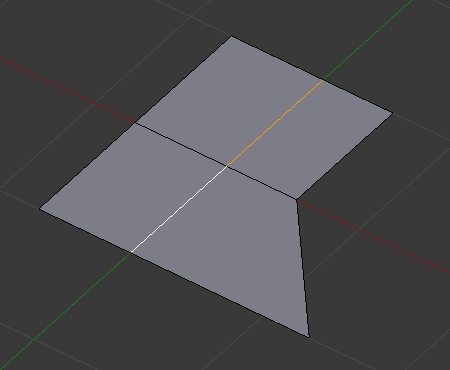
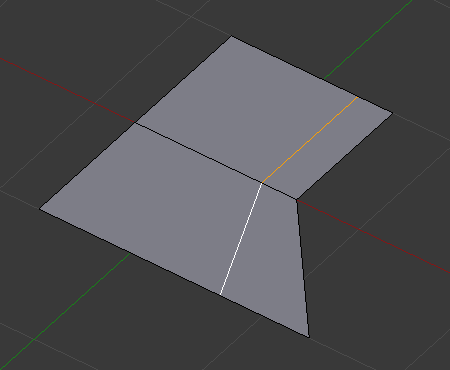
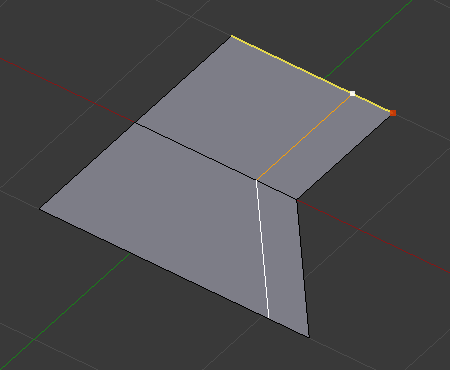
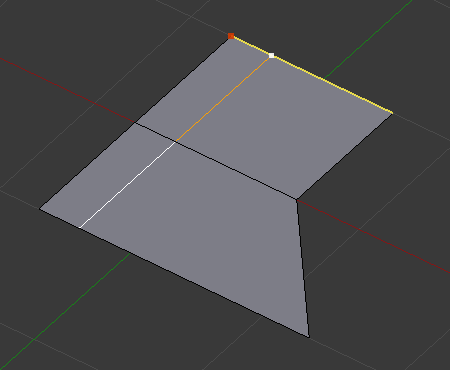
In Even mode, the vertices instead keep the same distance from their neighbor. The red dot indicates which side they look at (i.e. which neighbor they pick):
Opciones
While the tool is active, the Factor is shown at the top of the 3D Viewport and the shortcuts are shown in the status bar. After confirming with LMB, the options can still be changed in the Ajustar última operación panel.
- Factor
Direction and amount to slide. Values of -1 and 1 move each selected edge fully towards one of its neighbors.
- Uniforme E
By default, each vertex is moved by the same percentage along the length of its edge. Use Even to instead move all vertices so they’re at the same absolute distance from a neighboring vertex. (The Factor input is still a relative number, however.)
- Opuesto F
Use the other neighboring vertex when Even is active.
- Limitar Alt o C
Prevents the edges from moving outside their neighboring faces.
- Edición simétrica
Also slide matching edges on the other side of the mesh. Mesh Symmetry needs to be enabled for this to work.
- Corregir UV
Corrects the UV coordinates of the moved vertices to avoid texture distortion.
Ver también