Nodo Distribuir en superficie
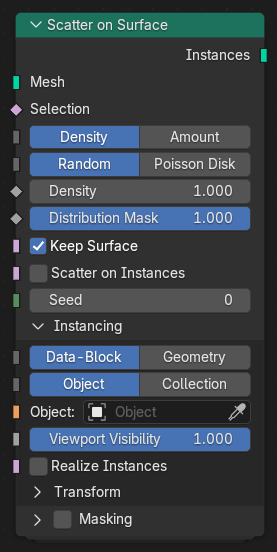
El nodo Distribuir en superficie distribuirá puntos o instancias a lo largo de la superficie de una malla. Proporcionará un control flexible sobre la forma en que los elementos serán ubicados mediante el uso de densidad, aleatorización y muestreo por disco de Poisson. Este nodo resultará útil para la distribución procedimental de objetos, tales como pasto, rocas o escombros sobre un terreno o cualquier otro tipo de superficie.
Entradas
- Malla
The input surface geometry on which points or instances will be scattered.
- Selección
Determines which faces or parts of the mesh are used for scattering. Unselected areas will not receive any scattered elements.
- Método de densidad
Determinará la forma en que se controlará la cantidad de puntos distribuidos.
- Densidad:
Uses a density field to define how many points are scattered per unit area.
- Cantidad:
Uses a fixed number of total scattered points across the surface.
- Método de distribución Densidad
Determines the pattern of scattered points when Density is used.
- Aleatorio:
Distributes points randomly across the surface.
- Disco de Poisson:
Distributes points evenly using a minimum separation distance.
- Densidad Densidad
Controls the number of scattered points per unit area when using the Density method.
- Cantidad Cantidad
The total number of points to scatter when using the Amount method.
- Máscara de distribución
A mask that limits the areas where scattering occurs. Values closer to
1.0allow scattering, while values near0.0exclude it.- Distancia mínima Disco de Poisson
Defines the minimum spacing between scattered points when using Poisson Disk distribution. Higher values result in more evenly spaced points but fewer total points.
- Mantener superficie
Keeps the original surface geometry in the output, instead of outputting only the instances.
- Distribuir sobre instancias
Enables scattering directly on existing instances rather than on a single mesh surface.
- Semilla
Random seed value used to vary the distribution pattern of scattered points or instances.
Instanciado
- Tipo de entrada
Defines how the instance geometry input is provided.
- Bloque de datos:
Instances are created from an object or collection data-block.
- Geometría:
Instances are created from input geometry provided to the node.
- Tipo de instanciado Bloque de datos
When using Data-Block input, determines whether to instance an Object or a Collection.
- Objeto / Colección Bloque de datos
The specific object or collection to instance when using Data-Block input mode.
- Instancia Geometría
The geometry to instance when using Geometry input mode.
- Visibles en vistas
Controls the percentage of scattered instances that are visible in the viewport.
- Convertir instancias en reales
Converts all instances into real geometry, producing a single combined geometry output. This can be required for some subsequent geometry operations or modifiers.
Escoger instancia Bloque de datos Colección
When instancing from a collection, this option enables random or controlled selection of which child object to instance per scattered point.
- Restablecer transformaciones
Resets the transform of instances before applying the scattering transform.
- Semilla de instancias
Controls the randomization of instance selection and transforms per scattered element.
Transformación
- Desplazamiento superficie
Moves instances along the element normal, offsetting them from the surface.
- Alinear rotación
Aligns instance rotation to the orientation of the geometry element (e.g., normal direction).
Eje de alineación
- Escala
Controls the uniform or per-axis scaling of instances.
Aleatorizar
Can be enabled through the boolean found in the panel header.
- Desplazamiento
The maximum translation offset for each axis. Defines the random range for instance movement.
- Rotación
The maximum rotation for each axis. Defines how much each instance can be rotated.
- Ejes (aleatorizar escala)
Determines how scaling is applied.
- Uniforme:
Applies a single random scale factor uniformly to all axes.
- Ejes:
Applies an independent random scale factor to each axis.
- Escala
The maximum scaling factor applied to each instance.
- Aleatorizar inversión
Randomly flips instances along one or more axes, effectively mirroring them.
- Semilla
An integer value that initializes the random number generator. Changing the seed produces a different random arrangement while keeping the same parameters.
Enmascarar
- Imagen de máscara
An image used to control scattering density or placement via UV mapping.
- Mapa UV
The UV map used to interpret the image mask for controlling distribution.
Salidas
- Instancias
The resulting instances scattered across the surface, distributed according to the selected method and parameters.