Спад (falloff)
The Falloff is a curve that determines how the strength of the brush decreases with increasing distance from the center. You can set up a custom curve or choose a predefined one.
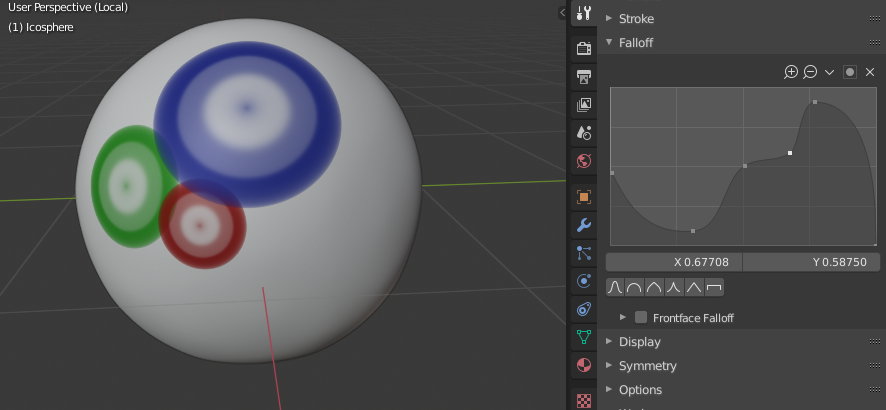
Пример спада кисти.
- Пресет кривой (curve preset)
- Особый (custom)
Shows a Виджет кривых for configuring a custom falloff. The left side of the curve corresponds to the center of the brush while the right side corresponds to the edge.
- Предустановленные
Предустановленные кривые спада выглядят следующим образом:


- Форма спада (falloff shape)
Определяет, как будет рассчитываться расстояние спада.
- Сфера (sphere):
The falloff is calculated using a sphere in three-dimensional world space. If two points on the mesh appear near each other in the 3D Viewport but are far away in the world, painting one will not affect the other.
- Проекция (projected):
The falloff is calculated using a circle in two-dimensional screen space. If two points on the mesh appear near each other in the 3D Viewport, painting one will also affect the other, no matter their distance in the world.
Texture Paint Mode does not have this option – it always uses Projected.
- Обычный / Спад направленных граней (normal falloff / front-face falloff)
Weakens the brush strength for faces whose normal points towards the screen edges instead of the camera.
Эта функция недоступна в режиме скульптинга.
- Угол (angle)
The minimum angle between the face normal and the viewing direction for the falloff to start.