Треугольники в четырёхугольники (triangles to quads)
Ссылка
- Режим (mode):
Режим редактирования (edit mode)
- Меню:
- Горячая клавиша:
Alt-J
Merges adjacent triangles in the selection into quads. This is essentially the opposite of Грани в треугольники (triangulate faces) and can be run on a complete mesh in one go.
The operator uses angle thresholds to prevent creating malformed quads, meaning that some triangles may remain.
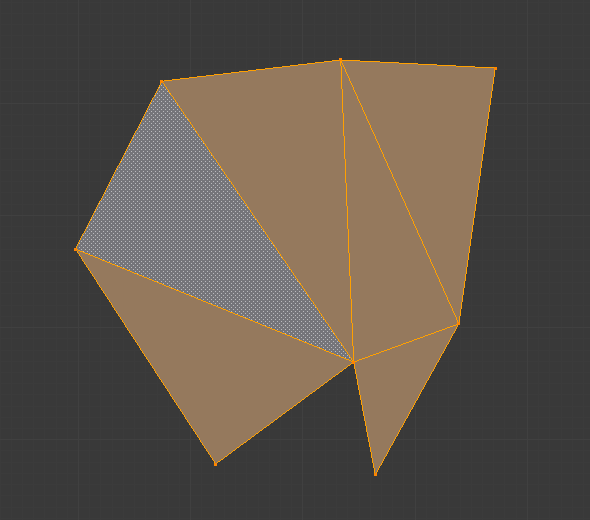
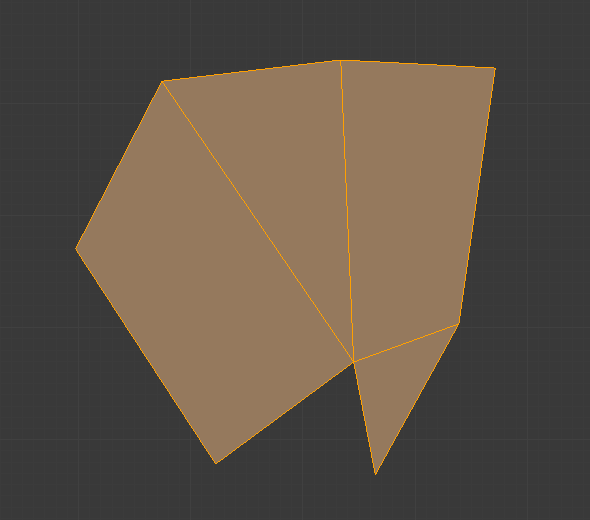
Опции (options)
- Max Face Angle
The maximum allowed angle between triangle normals (that is, coplanar triangles are considered to have an angle of 0°, not 180°). Triangle pairs that exceed this limit will not be merged.
- Max Shape Angle
The maximum tolerance for non-rectangular quads. If this is set to 0°, only triangles that form a quad with perfect 90° corners will be merged. If set to 40°, corners between 50° and 130° are allowed, and so on.
- Влияние топологии (topology influence)
How much to prefer creating new quads that match the topology of existing quads.
Совет
For best results, set Topology Influence between 100-130% and Max Angle to 180°. Lower values may leave behind parallelograms and triangles, while higher values may cause errors.
- Сравнивать UV (compare UVs)
Don’t merge triangles that are disjoint in any UV map.
- Сравнивать атрибуты цвета (compare color attributes)
Don’t merge triangles that, for any Color Attribute, have different colors at their shared edge.
- Compare Seam
Don’t dissolve edges that are marked as UV Seams.
- Сравнивать остроту (compare sharp)
Don’t dissolve edges that are marked as Sharp.
- Сравнивать материалы (compare materials)
Don’t merge triangles that have different materials.
- Снять выделение с объединённых (deselect joined)
Deselect the triangles that were successfully merged into quads. Useful for identifying the remaining triangles that still need to be converted.