Промежуточные (in-betweens)
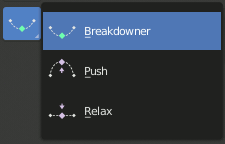
Инструменты промежуточных кадров.
Данные инструменты создают новую позу на основе ключей, окружающих текущий кадр. Это помогает быстро создавать промежуточные фазы движения на основе уже существующих ключевых поз.
Смешать позу с позой покоя (blend pose with rest pose)
Ссылка
- Режим (mode):
Объектный режим и Режим позы
- Меню:
- Меню:
Инструмент „Blend with Rest Pose“ производит линейную интерполяцию текущей позы к исходной (позе покоя). При смешивании с отрицательным коэффициентом поза, наоборот, удаляется от позы покоя. В отличие от других инструментов, для этого требуется всего один ключевой кадр, а не два.
Сдвинуть позу от средней (push pose from breakdown)
Ссылка
- Режим (mode):
Объектный режим и Режим позы
- Инструмент (tool):
- Меню:
- Меню:
- Горячая клавиша:
Ctrl-E
Инструмент „Push Pose“ интерполирует текущую позу, отдаляя её от линейной интерполяции между окружающими ключами. Представьте позу на текущем кадре, которая линейно вычисляется на основе окружающих ключей. Это та базовая поза, от которой данный инструмент отдаляет результат.
Смягчить позу к средней (relax pose to breakdown)
Ссылка
- Режим (mode):
Объектный режим и Режим позы
- Инструмент (tool):
- Меню:
- Меню:
- Горячая клавиша:
Alt-E
Инструмент „Relax Pose“ – это противоположность „Push Pose from Breakdown“. Следовательно, при максимальном влиянии результирующая поза станет идентичной линейной интерполяции между соседними ключами.
Интерполятор позы (pose breakdowner)
Ссылка
- Режим (mode):
Объектный режим и Режим позы
- Инструмент (tool):
- Меню:
- Меню:
- Горячая клавиша:
Shift-E
Создаёт подходящую промежуточную позу на текущем кадре.
Работу инструмента „Breakdowner“ можно ограничить определёнными типами трансформаций и осями, нажимая следующие клавиши при активном инструменте:
G, R, S: перемещать, вращать, масштабировать
B: сгибаемые кости
C: пользовательские свойства
X, Y, Z: к соответствующим осям
Сочетать с соседним (blend to neighbor)
Ссылка
- Режим (mode):
Объектный режим и Режим позы
- Меню:
- Меню:
- Горячая клавиша:
Shift-Alt-E
Инструмент плавно смешивает текущую позу с соседними ключевыми кадрами на шкале времени. Для работы этого оператора необходимо, чтобы до и после текущего кадра обязательно находился ключевой кадр.