Copy Location Constraint – Примус «Копіювання Локації»
The Copy Location constraint forces an object or bone to match the location of a target.
Важливо
This constraint has no effect on connected bones as their position is determined by their parent bone.
Опції
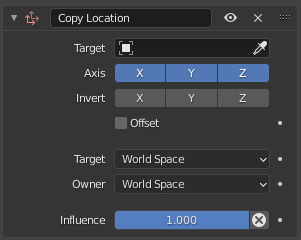
Copy Location constraint.
- Ціль
The object or bone whose location to copy.
- Axis – Вісь
The axes for which to copy location coordinates.
- Invert – Інверт
The axes for which invert the sign (so a coordinate of 10 becomes -10 and vice versa).
- Offset – Зсув
When enabled, the target’s current position (from all its constraints) is not copied over, but added to the owner’s original position (from its preceding constraints).
- Target/Owner
The spaces for retrieving the coordinates from the target and for applying them to the owner.
- Вплив
How strongly the constraint affects the owner.
Examples – Приклади
Bones and Vertex Groups
This video shows the effect of the Head/Tail setting when targeting a bone, as well as the Vertex Group setting when targeting a mesh.
Solar System
In the animation below, the camera follows the moon as it orbits the Earth, switches to following the Earth as it orbits the Sun, and finally moves to a fixed location for showing the Sun. This is done using two Copy Location constraints – one for the moon and one for the Earth – with animated Influence values for smoothly disabling one while enabling the other.