Трансформувати
Посилання
- Режим:
Режим Об’єкта
- Панель:
- Панель:
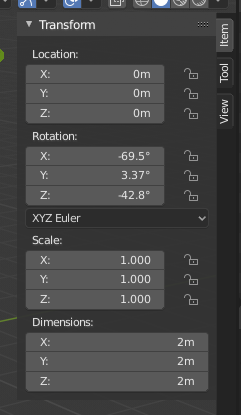
Властивості Трансформування.
The Transform panel in the Sidebar region allows you to view and manually/numerically control the position, rotation, and other properties of an object, in Object Mode. Each object stores its position, orientation, and scale values. These may need to be manipulated numerically, reset, or applied. In Edit Mode. It mainly allows you to enter precise coordinates for a vertex, or median position for a group of vertices (including an edge/face). As each type of object has a different set of options in its Transform panel in Edit Mode, see their respective descriptions in the Modeling chapter.
Use this panel to either edit or display the object’s transform properties such as position, rotation and/or scaling. These fields change the object’s origin and then affect the aspect of all its vertices and faces.
- Розташування
The object’s origin location in local coordinates.
- Обертання
The object’s local orientation, relative to the global axes and its own origin.
- Rotation Mode – Режим Обертання
Method for calculating rotations, additional information can be found in the manual’s appendix.
- Euler – Ейлер:
The gizmo handles are aligned to the Euler axis, allowing you to see the discrete XYZ axis underlying the Euler rotation, as well as possible Gimbal Lock.
- Axis Angle – Вісь-Кут:
The X, Y, and Z coordinates define a point relative to the object origin. This point and the origin define an axis around the W value defines the rotation.
- Quaternion – Кватерніон:
X, Y, Z та W відповідають компонентам Кватерніона – Quaternion.
- Масштаб
The object’s relative scale along the local axis (e.g. the Scale X value represents the scale along the local X axis). Each object (cube, sphere, etc.), when created, has a scale of one unit in each local direction. To make the object bigger or smaller, you scale it in the desired axis.
- Розмірності – Dimensions
Розмір габаритної коробки об’єкта (що вирівняна по локальних осях – уявіть картонну коробку, що повністю охоплює, вміщає об’єкт).
- Блокування Властивостей Трансформування – Transform Properties Locking
When the toggle is locked, the corresponding transformation value can not be changed in any interactive operation. But the value can still be changed using non-interactive operations, like editing the corresponding number field or using Python.
For example, if you locked the Location X property then you cannot use the 3D gizmo to move the object along the global X axis. But you can still move it using the Location X number field. Consider the locking feature as a rigid constraint only changeable from the panel.
To lock a property, click the padlock icon next to the button. The button is unlocked if the icon shows an open padlock, and it is locked if the icon appears as a closed padlock.
Дельта Трансформ – Delta Transforms
Посилання
- Режим:
Режим Об’єкта
- Панель:
Delta Transforms are simply transformations that are applied on top of the transforms described above. Delta Transforms are particularly useful in animations. For example, you can animate an object with the primary transforms then move them around with Delta Transforms.
Parent Inverse Transform
Посилання
- Режим:
Режим Об’єкта
- Панель:
- Context – Контекст:
Available when the selected object is parented by another object.
The Parent Inverse transform defines how the child object’s local space is offset relative to its parent. It ensures that when parenting is created, the child keeps its current world position, even though it now inherits transforms from the parent.
The matrix is displayed decomposed into Location, Rotation, and Scale values. These represent the offset needed to maintain the child’s position relative to its parent. The values are read-only and shown for inspection only.
The Rotation Mode determines how the rotation component is displayed, and can be switched between systems such as XYZ Euler, Axis Angle, or Quaternion. This behaves identically to the Rotation Mode – Режим Обертання selector used in the main transform panel.
Clear Parent Inverse Transform
Clears the Parent Inverse matrix from the selected objects. With an empty matrix, the location, rotation, and scale properties of the children are interpreted directly in the coordinate space of the parent.
This effectively makes the child’s transforms relative to the parent’s origin, potentially moving the object in world space.
See Зчистити Приріднення – Clear Parent for additional methods to clear or manage parent-child relationships.