Вступ
The Graph Editor lets you edit animation curves, which determine how properties change over time.
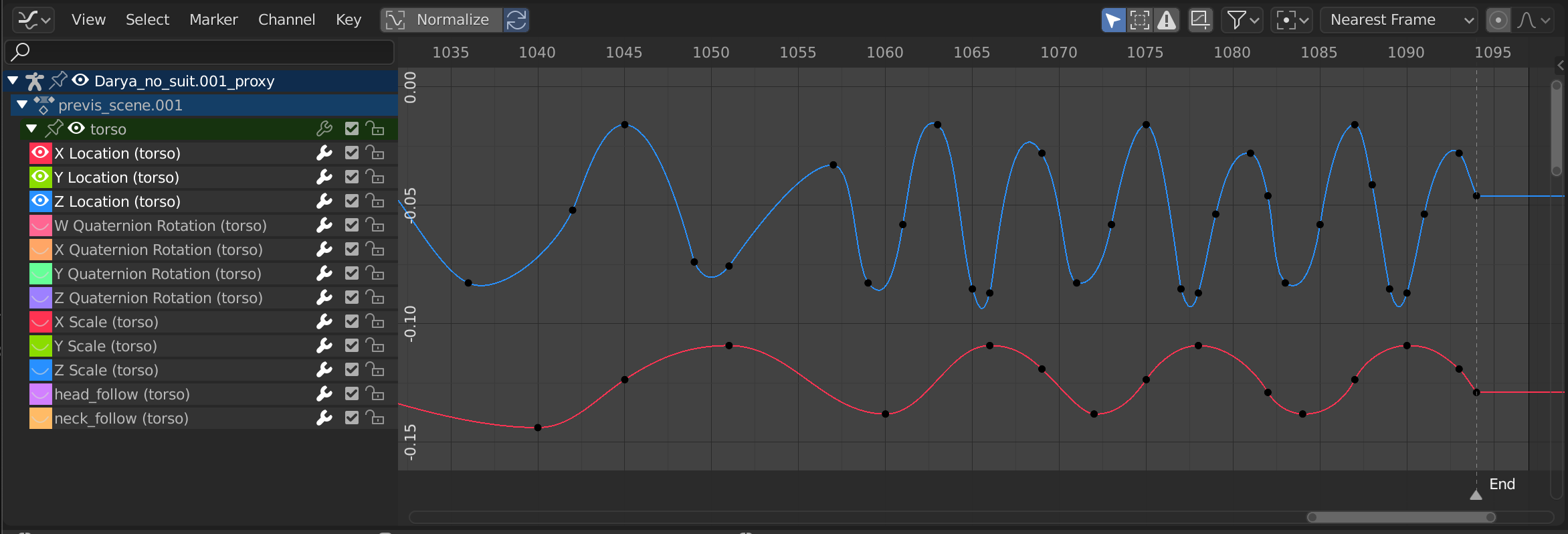
Graph Editor – Редактор Графів.
Main Region – Головний Регіон
The curve view allows you to view and edit F-Curves. An F-Curve has several key parts:
- Curve – Крива
The curve describes how the value of a property (Y axis) evolves over time (X axis).
- Keyframes
Keyframes are user-defined values on certain frames and are represented by little black discs that become orange when selected. The values on the other frames are calculated automatically by interpolating between these keyframes.
- Handles
Each keyframe has two handles – points that can be dragged around to influence the shape of the curve around it.
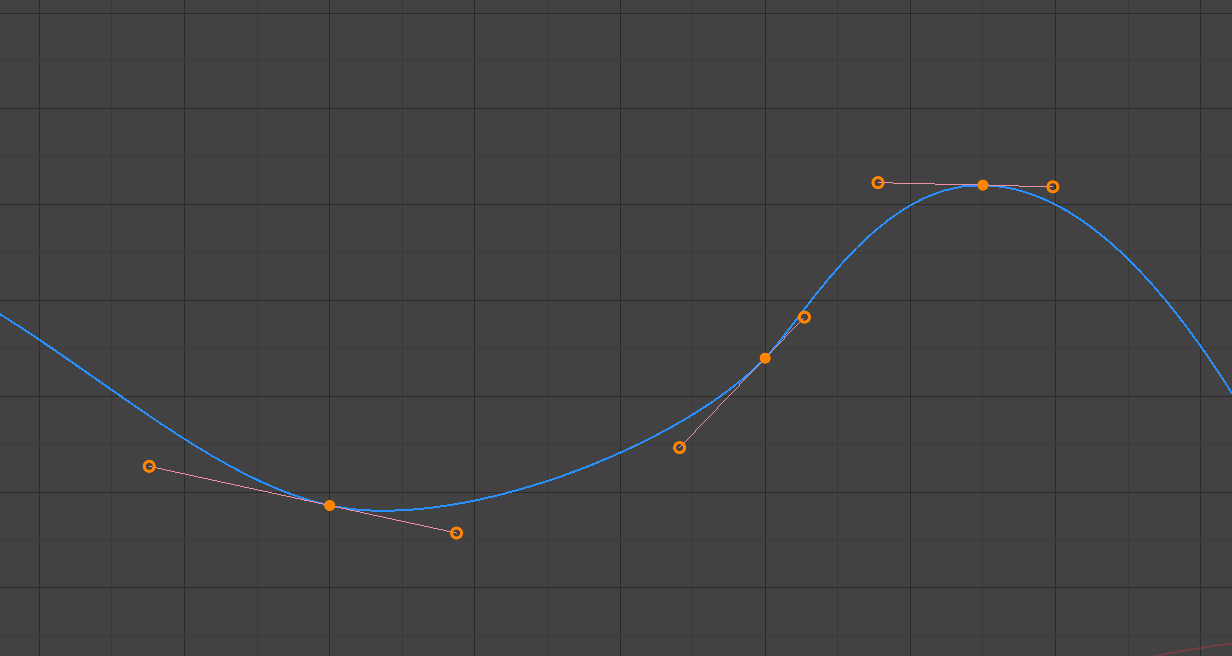
A simple curve. The discs are keyframes, and the circles are their handles.
Дивись також
Дивіться F-Curves для отримання додаткової інформації.
Playhead & 2D Cursor – Позиція Грання та 2D Курсор
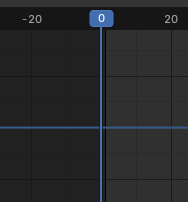
2D Курсор Редактора Графів.
The current frame is represented by a vertical blue line called the Playhead. Like other Редактори Анімації, you can move it by clicking or dragging with LMB in the scrubbing area at the top.
Combined with the horizontal blue line, the Playhead forms the 2D Cursor which can be used as a pivot point for rotating and scaling. You can disable the horizontal line using or .
The 2D Cursor can be moved by clicking or dragging with Shift-RMB or by adjusting its coordinates in the View tab of the Sidebar.
Заголовок
View Menu – Меню «Огля件
- Бічносмуга – Sidebar N
Shows or hides the Sidebar Region.
- Наладнати Останню Операцію – Adjust Last Operation
Displays a pop-up panel to alter properties of the last completed operation. See Наладнати Останню Операцію – Adjust Last Operation.
- Channels – Канали
Shows or hides the Channels Region.
- Елементи Керування Відтворенням
Show or hide the Playback Controls.
- Frame Selected NumpadPeriod – Вибране в Кадр
Pans and zooms the view to focus on the selected keyframes.
- Frame All Home – Усе в Кадр
Pans and zooms the view to show all keyframes.
- Local View NumpadSlash, Slash
Isolates the selected F-Curves in the Graph Editor view.
While Local View is enabled, only the isolated F-Curves are visible and editable in the Graph Editor.
Use the operator again to restore the normal view and show all F-Curves.
- Frame Scene/Preview Range
Reset the horizontal view to the current scene frame range, taking the preview range into account if it is active.
- Go to Current Frame Numpad0 – Переходження до Поточного Кадру
Центрує область на позиції грання – Playhead.
- Realtime Updates – Реальночасові Оновлення
Whether to update other views (such as the 3D Viewport) while you’re moving keyframes around. If disabled, the other views only get updated once you finish the move.
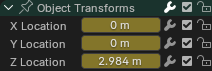
Sliders.
- Show Sliders – Показ Повзунків
Shows a value slider next to each channel. Adjusting such a slider automatically creates a keyframe.
- Auto-Merge Keyframes
Automatically merge keyframes that end up on the same frame after transformation.
- Auto-Lock Key Axis
Automatically locks the movement of keyframes to the axis that best matches the direction of the mouse cursor.
- Show Markers – Показ Маркерів
Shows the marker region. When disabled, the Marker Menu is also hidden and marker operators are not available in this editor.
- Show Cursor – Показ Курсора
Toggles the visibility of the horizontal blue line (see Playhead & 2D Cursor).
- Use Timecode Ctrl-T
Show timing in seconds instead of frames. As an example, the timestamp
01:03+02means «1 minute, 3 seconds, 2 frames.»- Sync Visible Range
Synchronizes the horizontal panning and scale of the editor with other time-based editors that also have this option enabled. That way, they always show the same section of time.
- Show Extrapolation – Показ Екстраполяції
Перемикає видимість екстрапольованої – extrapolated частини кривих.
- Show Handles Ctrl-H – Показ Держаків
Toggles the display of keyframe handles.
- Only Selected Keyframe Handles – Лише Держаки Вибраних Ключкадрів
Only shows the handles for the selected keyframes.
- Set Preview Range P – Задання Діапазону Передогляду
Lets you drag a box to define a time range for previewing. As long as this range is active, playback will be limited to it, letting you repeatedly view a segment of the animation without having to manually rewind each time.
You can change the start or end frame using the corresponding button in the Timeline editor’s Playback popover. Alternatively, you can simply run Set Preview Range again.
- Clear Preview Range Alt-P – Зчищення Діапазону Передогляду
Зчищає заданий діапазон передогляду.
- Set Preview Range to Selected Ctrl-Alt-P
Applies a preview range that encompasses the selected keyframes.
- Toggle Dope Sheet
Changes the area’s editor to the Dope Sheet Editor.
- Area – Область
Area controls. See the user interface documentation for more information.
Marker Menu
Markers are used to denote frames with key points or significant events within an animation. Like with most animation editors, they’re shown at the bottom.

Маркери в редакторі анімації.
Щодо описів різних засобів маркерів дивіться – Editing Markers.
Normalize – Нормалізування
Scales the display of each curve so that they all (appear to) occupy the same value range, going from -1 to 1. This can make editing easier when you’re working with curves whose value ranges are far apart.
When you enable this option, the view is zoomed accordingly and the area outside the normalized value range is darkened.
If a preview range is defined, keyframes within the range are normalized, while the others are scaled proportionally.
Auto Normalization
Automatically recalculate curve normalization on every curve edit.
View Controls – Керувальники Огляду

Керувальники огляду.
- Show Only Selected – Показ Лише Вибране
Only show curves belonging to objects/bones/… that are selected.
- Show Hidden – Показ Сховане
Show keyframes from objects/bones/… that are hidden.
- Show Only Errors – Показ Лише Помилок
Only show channels that have errors (for example, because they try to animate a property that doesn’t exist on the object).
- Create Ghost Curves (framed F-Curve icon)
Creates a snapshot of the current curves and shows it in the background so that you can use it as a reference. Click the button again to clear the snapshot.
- Filter (funnel icon) – Фільтр (іконка лійки)
- Пошук
Filters the channel list by a search term.
- Filtering Collection – Колекція Фільтрування
Select a collection to only show keyframes from objects in that collection.
- Filter by Type – Фільтр за Типом
Фільтрування кривих за типом властивості.
- Sort Data-Blocks – Сортування Блоків Даних
Sorts data-blocks alphabetically to make them easier to find.
If your playback speed suffers because of this (should only really be an issue when working with lots of objects), you can turn it off.
Transform Controls – Керувальники Трансформ

Transform controls.
- Pivot Point – Точка Опертя
Pivot point for rotating and scaling.
- Bounding Box Center – Центр Габаритної Коробки
Center of the smallest possible box around the selected keyframes.
- 2D Cursor – 2D Курсор
The intersection between the Playhead and the horizontal Cursor line.
- Individual Centers – Індивідуальні Центри
Rotate/scale each handle around its keyframe.
- Snap – Підхоп
The icon toggles snapping on or off. The dropdown offers the following options:
- Snap To – Підхоп До
Type of element to snap to.
- Frame – Кадр:
Snap to full frames.
- Second – Секунда:
Snap to seconds.
- Nearest Marker – Найближчий Маркер:
Snap to the nearest Marker.
- Absolute Time Snap
When disabled, keyframes will move in increments of Snap To. For example, if you selected Second and have a keyframe that’s currently on 0:06+5, dragging it to the right will snap it to 0:07+5. Its time increases by a second, and its subsecond offset of 5 frames remains the same.
When enabled, keyframes will snap to multiples of Snap To. Taking the above example, the keyframe would snap to 0:07+0, removing the subsecond offset.
- Proportional Editing O – Пропорційне Редагування
Дивіться Proportional Editing.
Елементи Керування Відтворенням
The Playback Controls region contains controls and options related to playback, keying, auto keyframing, and transport.
Ці налаштування дозволяють вам:
Контролювати як анімації попередньо виглядають та синхронізовані з аудіо.
Вставляти та керувати ключкадрами через налаштування наборів та авто налаштування.
Переходити по часовій лінії використовуючи елементи керування відтворенням та транспорту.
Коректувати діапазони кадрів та переглядати певні сегменти анімації.
Дивись також
For a detailed description of all properties and controls commonly found in the footer, see the Playback Controls documentation.
Sidebar Region – Регіон Бічносмуги
View Tab – Вкладка «Огля件
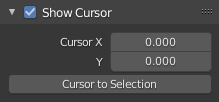
Вкладка View – «Огляд».
- Show Cursor – Показ Курсора
Toggles the visibility of the 2D Cursor’s horizontal line.
- Cursor X, Y – Курсор X, Y
Shows, and lets you change, the X coordinate (current frame) and Y coordinate (value) of the 2D Cursor.
- Cursor to Selection – Курсор до Вибрання
Places the 2D Cursor at the average time and value of the selected keyframes.
- Cursor Value to Selection – Значення Курсора до Вибрання
Places the 2D Cursor at the average value of the selected keyframes, leaving its time unchanged.
F-Curve Tab – Вкладка «Ф-Крив໶
See F-Curve Properties.
Modifiers Tab – Вкладка «Модифікатор軶
Дивіться F-Curve Modifiers.