UV Overlays
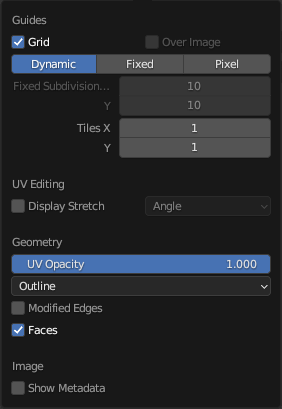
The Overlays pop-over.
In the header, there is a button to turn off all overlays for the UV Editor. This option also toggles the visibility of UDIM tile information.
The drop-down button opens a pop-over with more detailed settings. The following categories are available:
Guides – Напрямники
- Grid – Сітка
Show the grid.
- Over Image
Show the grid on top of the image rather than behind it.
- Grid Shape Source
How the row and column counts are determined.
- Динамічно – Dynamic:
The grid starts at 8×8 cells that are automatically subdivided further as you zoom in.
- Fixed – Фіксовано:
The row and column counts are fixed and can be configured manually.
- Pixel – Піксель:
Each grid cell matches one image pixel.
- Fixed Subdivisions X, Y
Number of columns/rows in the grid.
- Tiles X, Y
The number of UDIM tile grids to display in each cardinal direction.
UV Stretch
- Display Stretch
Visualize UV distortion by comparing the UV mapping to the original 3D mesh.
Blue indicates little distortion, while red indicates high distortion.
- Display Stretch Type
Method used to measure distortion.
- Angle – Кут:
Compare the angles of mesh faces with their corresponding UV faces. This highlights angular distortion introduced by the UV mapping.
- Area – Область:
Compare the area of mesh faces with their corresponding UV faces. This highlights differences in scale between the 3D mesh and the UV layout.
- Opacity – Безпрозорість
Adjust the opacity of the stretch visualization overlay.
Геометрія
- Display UVs Object Mode
Show the active UV map as an overlay in the UV Editor.
- Обличчя
Adjust the opacity of face fill colors in UV overlays.
- Edges – Краї
Adjust the opacity of edge colors in UV overlays.
- UV Opacity Edit Mode
Opacity of edges and faces.
- Display As Edit Mode
Control how edges are shown.
- Обрис – Outline:
Display edges in gray with a black outline.
- Пунктир – Dash:
Display edges as dashed black-gray lines.
- Чорне – Black:
Display edges in black.
- Біле – White:
Display edges in white.
- Modified Edges Edit Mode
Additionally show the edges as they look after applying modifiers (in gray).
- Faces Edit Mode
Показуються грані поверх зображення.
Image – Зображення
- Show Metadata – Показ Метаданих
Display metadata about the selected Render Result. See the Output tab’s Metadata – Метадані panel to change what metadata to include.