Node Bundles
A bundle is a container that groups multiple values into one socket. This makes it possible to pass many values through a single link, similar to a struct in programming.
Bundles reduce the number of exposed inputs and outputs in a node group, and can contain mixed data types such as geometry, fields, values, objects, or even nested bundles.
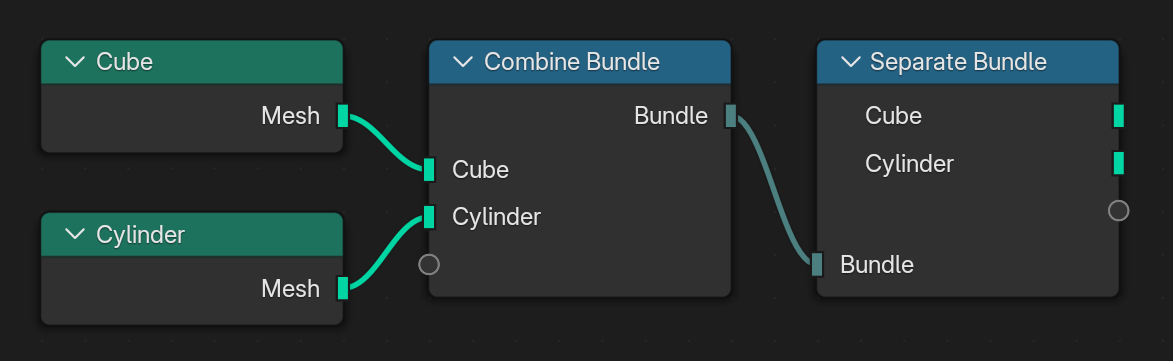
A cube and cylinder combined into a bundle, then separated again.
Nodes – Вузли
The following nodes are provided for working with bundles:
Bundle nodes allow adding or removing an arbitrary number of sockets, with flexible type support.
Bundles can be attached to geometry using get/set geometry bundle nodes. These can be used to pass bundled data between modifiers and objects.
Typed Bundles
A typed bundle is a bundle that contains a special Type item identifying its purpose. The type is stored as a string and allows node groups to recognize bundles without relying on their internal structure.
Using types makes bundles easier to exchange between node groups and different Geometry Nodes modifiers, since a node group can search for a specific type rather than assuming a particular bundle layout.
Bundles can also contain other bundles, allowing complex data to be organized hierarchically.
Creating Typed Bundles
The Add Typed Bundle operator creates a typed bundle by constructing a bundle containing the required Type item.
Важливо
The string item named Type is reserved for identifying typed bundles.
It should not be used for any other purpose within a bundle.
Searching Typed Bundles
The Get Nested Bundle Paths node searches a bundle hierarchy for bundles with a matching type.
This allows node groups to locate typed bundles even when they are nested inside other bundles.
For example, a geometry may contain multiple bundles describing different components. A node group can search for all bundles of a particular type without requiring them to exist at a fixed location.
Використання
Bundles are useful in many workflows:
Simplified interfaces – group inputs into a single socket for clarity.
Physics simulations – package all entities and constraints for a solver.
Declarative systems – store complex structured data for evaluation later.
Texture sets – combine PBR maps (Base Color, Roughness, Normal) into one socket.
Socket Syncing
Bundles use socket names to match their inputs and outputs. If two bundle nodes are connected but have mismatched signatures, Blender can offer to sync them automatically.
Sync happens automatically when a node is connected for the first time.
Existing sockets are never updated automatically to avoid overwriting data.
A button (Sync Sockets) button appears in the node header when a mismatch is detected, allowing manual synchronization.