Stabilize 2D Node – Вузол «Стабілізування 2D»
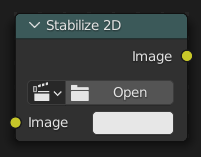
Стабілізує фільмоматеріал відповідно до устав, заданих у – «Редактор Відеокліпів > Властивості > Стабілізація > 2D Стабілізація». Для отримання додаткової інформації дивіться 2D Stabilization.
Inputs – Уводи
- Image – Зображення
Standard color input.
- Frame – Кадр
Frame from which to evaluate the stabilization data.
By default, this uses the current scene frame, but it can be driven independently when the image is time-remapped, offset in time, or otherwise evaluated at a different frame than the scene.
- Invert – Інверт
Інвертується стабілізація. Якщо розраховувана стабілізація полягає у переміщенні відеокліпу уверх на 5 одиниць, то при увімкненні цього буде переміщення відеокліпу вниз на 5 одиниць.
Sampling – Відбір
- Filter – Фільтр
Determines how pixel values are interpolated when scaling or transforming images.
- Nearest – Найближче:
Uses the value of the closest pixel with no smoothing. This is the fastest method and is well-suited for pixel art or low-resolution images where sharp, blocky edges are desirable. In animations, motion appears in single-pixel steps, which can cause visible jittering.
- Bilinear – Білінеарно:
Averages the values of surrounding pixels to create a smoother result than Nearest. Provides a good balance between performance and visual quality.
- Bicubic – Бікубічно:
Computes a weighted average of a larger neighborhood of pixels for even smoother results. Ideal for photographic images or gradients where preserving fine detail is important.
- Anisotropic:
Adjusts interpolation based on the direction and scale of the transformation. Helps reduce blurring or aliasing when scaling at steep angles or uneven resolutions, especially useful in textures viewed at oblique angles or in detailed 3D projections.
Властивості
- Movie Clip – Відеокліп
The movie clip whose stabilization to use.
Outputs – Виводи
- Image – Зображення
Standard color input.