Split Node

The Split node combines two input images into a single output image, displaying them side by side or along a rotated split line. This is useful for comparing two versions of an image, such as before and after a color correction, compositing effect, or render adjustment.
Inputs – Уводи
- Position – Позиція
A 2D vector that defines the location of the split line in normalized coordinates. The X and Y values range from 0 to 1, where (0.5, 0.5) places the split line at the center of the image.
- Обертання
Adjusts the angle of the split line in degrees.
- Image – Зображення
The first image input, displayed on one side of the split.
- Image – Зображення
The second image input, displayed on the opposite side of the split.
Outputs – Виводи
- Image – Зображення
The combined image showing both inputs divided by the split line.
Gizmos – Гізмо
The Split node provides an interactive gizmo in the Node Editor. To enable it, make sure Active Node Gizmo is turned on, then select the Split node.
The gizmo displays a split line with draggable handles:
Drag the line to adjust the split position horizontally or vertically.
Use the circular handle at the center to adjust the rotation interactively.
Examples – Приклади
The Split node is typically used for comparing two images directly in the compositor. It can be connected to a Viewer Node to preview before-and-after results, such as comparing an ungraded render against a color-corrected version.
It can also be used to align transitions between scenes or shots by displaying the last frame of one scene alongside the first frame of another, helping ensure visual consistency.
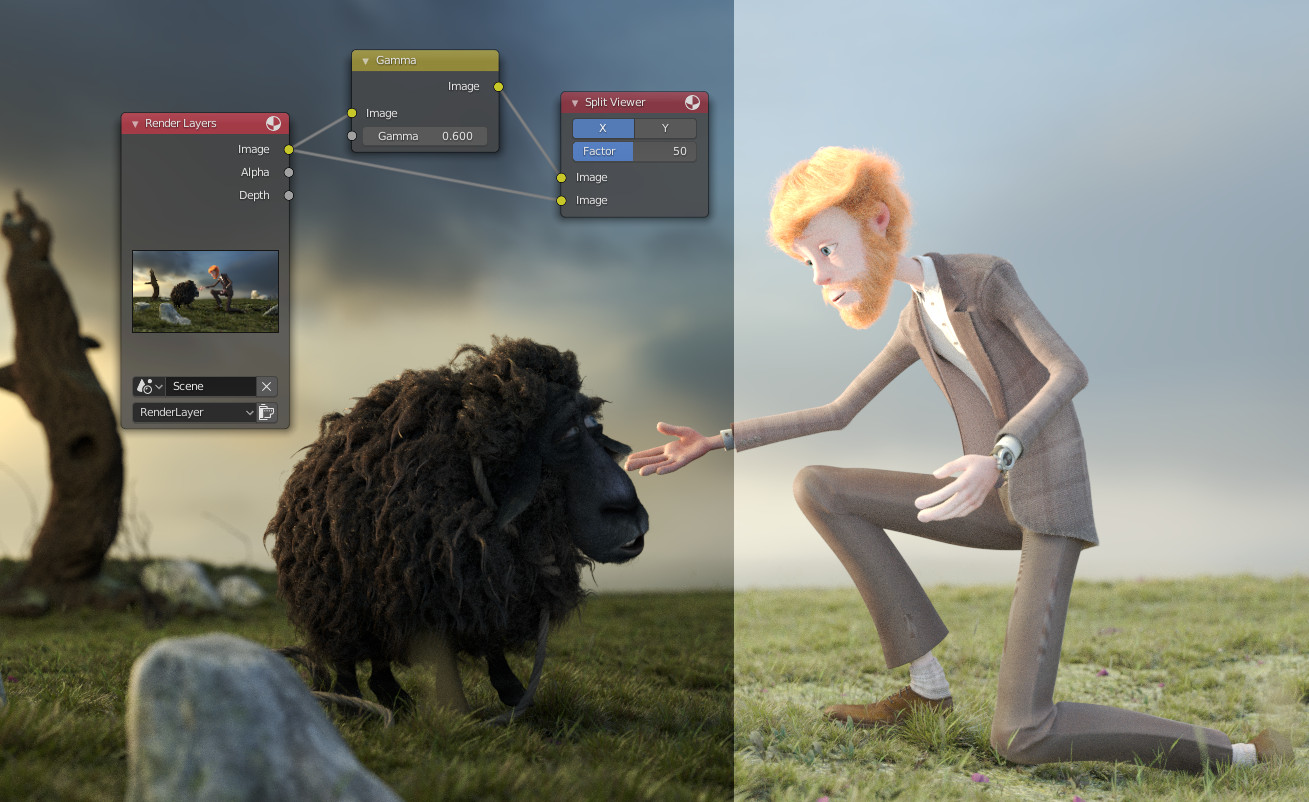
Comparing two images using the Split node.