Вибрати Усе за Рисою – Select All by Trait
Non Manifold
Посилання
- Режим:
Режим Редагування
- Меню:
Selects the non-manifold geometry of a mesh. This entry is only available in the Vertex and Edge selection modes.
Опції
- Розширити
Adds to the current selection instead of replacing it.
- Дріт
Selects edges that do not belong to any face.
- Boundaries – Рубежі
Selects edges at boundaries and holes.
- Кілька Граней – Multiple Faces
Вибирає ребра, що належать трьом або більше граням.
- Не Стичне – Non Contiguous
Вибирає ребра, що належать точно двом граням з протилежними нормалями.
- Vertices – Вершини
Selects vertices that are isolated, belong to an edge that’s a Wire or has Multiple Faces, or are the only vertex connecting two faces.
Незв’язана Геометрія – Loose Geometry
Посилання
- Режим:
Режим Редагування
- Меню:
Depending on the selection mode, this operator selects vertices that are not part of any edge, edges that are not part of any face, or faces that do not share an edge with any other face.
Внутрішні Грані – Interior Faces
Посилання
- Режим:
Режим Редагування
- Меню:
Selects faces that may have been accidentally created inside the mesh instead of on the mesh’s surface. Specifically, it selects faces with «abnormal» neighbors (multiple neighbors connected to the same edge), as well as any «normal» neighbors of those faces.
Грані за Боками – Faces by Sides
Посилання
- Режим:
Режим Редагування
- Меню:
Selects all faces that have a certain number of edges. The number can be specified in the Наладнати Останню Операцію – Adjust Last Operation panel.
Poles by Count
Посилання
- Режим:
Режим Редагування
- Меню:
Finds vertices that are a pole, namely vertices that are connected to an irregular number of edges. Then, selects either those poles (in vertex selection mode) or the edges/faces connected to them (in edge/face selection mode).

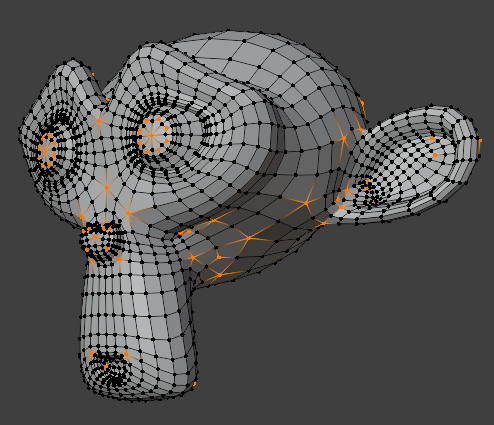
Опції
- Pole Count
Specifies the number of edges a vertex must (not) have to be considered a pole.
- Тип
Defines the comparison method for determining poles:
- Less Than – Менше Ніж:
Find vertices that have fewer edges than Pole Count.
- Equal To:
Find vertices that have exactly Pole Count edges.
- Greater Than – Більше Ніж:
Find vertices that have more edges than Pole Count.
- Not Equal To:
Find vertices that have more or fewer edges than Pole Count.
- Розширити
Adds to the existing selection rather than replacing it.
- Exclude Non Manifold
Skips poles that are part of non-manifold geometry.
Підказка
Poles can cause ugly pinching when using the Модифікатор «Підподілення Поверхні» – Subdivision Surface Modifier, so this operator is useful for finding them.
Негруповані Вершини – Ungrouped Vertices
Посилання
- Режим:
Режим Редагування
- Меню:
Selects all vertices that are not part of any vertex group.