Display – Показ
Sequencer Overlays
Посилання
- Розташування:
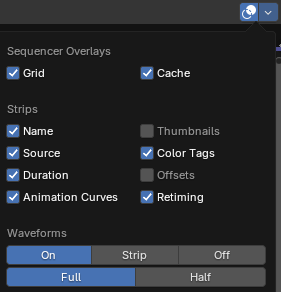
Overlays are information that is displayed on top of the sequencer region. Clicking (Show Overlays) toggles all overlays in one go, while the drop-down button shows a pop-over where you can toggle individual ones:
- Grid – Сітка
Shows vertical lines at regular time intervals.
- Кеш – Cache
Visualize cached images on the timeline.
Strips – Смужки
- Назва
Shows the Name of each strip.
- Source – Джерело
Shows the file path of each strip.
- Duration – Тривалість
Shows the length of each strip (in frames).
- Animation Curves
Shows animation curves for volume (Sound strips) and opacity (other strips).
- Color Tags
Displays each strip in its designated custom color (if applied) rather than a color representing its type. To set a custom color, either click the Color Tag button next to the strip’s name in , or use Set Color Tag in the strip’s context menu.
- Offsets
Shows overflow bars of content that was trimmed from the strip (by moving the strip’s handles). See Старт/Кінець Зсуву Смужки – Strip Offset Start/End.
Thumbnails – Мініатюри
- Thumbnails – Мініатюри
How thumbnails are displayed. The thumbnail size depends on the vertical zoom level (which can be adjusted by dragging up and down with Ctrl-MMB). Zooming in results in taller strips with bigger, but fewer thumbnails. Zooming out results in narrower strips with smaller, but more thumbnails.
- Нічого:
Do not show strip thumbnails.
- Strip Ends:
Show thumbnails only at the beginning and end of the strip.
- Continuous:
Displays thumbnails across the full width of each Movie or Image strips.
Waveforms
- Тип
Global options for waveform display on Sound strips.
- On:
Enable waveforms for all strips.
- Strip – Смужка:
Use the Display Waveform option of each individual strip.
- Вимк – Off:
Disable waveforms for all strips.
- Style – Стиль
How Waveforms are displayed.
- Full – Повністю:
Displays the audio amplitude.
- Половина – Half:
Displays the audio level.