Armature Constraint – Примус «Арматур໶
The Armature constraint transforms an «owner» object or bone based on the weighted pose transformations of one or more «target» bones. It’s similar to the Модифікатор «Арматура» – Armature Modifier, which performs this operation for every vertex in a mesh.
Unlike the modifier, the constraint also uses bones whose Deform option is disabled.
Дивись також
The Child Of Constraint – Примус «Нащадок» is an alternative if there’s only one parent. Unlike with the Armature constraint, this parent can also be an object.
Опції
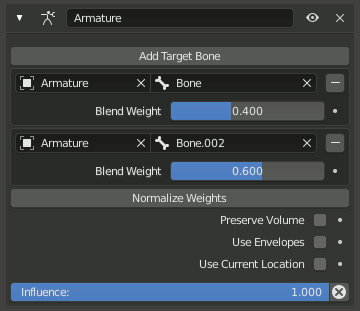
Примус Armature.
- Preserve Volume – Берегти Об’єм
Prevents the owner from shrinking when the target bones rotate relative to each other.
- Use Envelopes – Вжити Оболонки
Uses Envelopes to weaken the influence of target bones that are further away. For best results, set the Weight of all bones to 1.0.
Примітка
Unlike the modifier, the constraint does not automatically detect nearby bones. Every bone has to be added manually.
- Use Current Location Bone constraint only
By default, the constraint uses the rest location of the owner bone to find nearby envelopes and B-Bone segments. This option uses the bone’s current location instead (so including the pose transformation and prior constraints).
Objects don’t have a rest location, so for them, the constraint always uses the current location.
- Add Target Bone – Додати Цільову Кістку
Adds a new entry to the Bones list.
- Normalize Weights – Нормалізувати Вагомості
Normalizes the Weights in the Bones list so they add up to 1.0.
- Вплив
How strongly the constraint affects the owner.
Кістки
The list of target bones used to transform the owner.
- Ціль
The armature object containing the bone. Unlike the modifier, the constraint can use bones from different armatures.
- Sub-Target
The name of the bone.
- (Remove Target)
Removes the entry from the list.
- Вагомість
Weight associated with the bone. With the modifier, this weight would come from a vertex group instead.