Intersect (Boolean)
Посилання
- Режим:
Режим Редагування
- Меню:
Performs Boolean operations between the selected and unselected geometry.
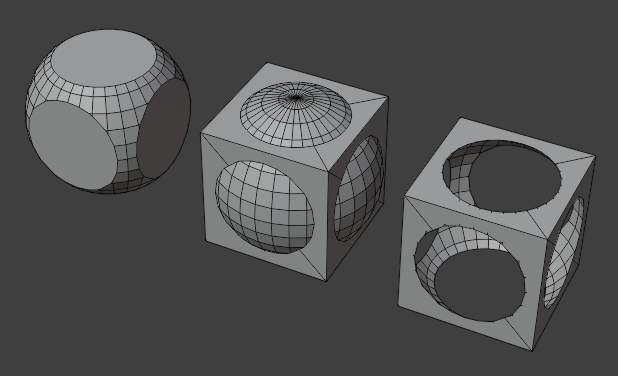
Selecting a sphere and performing an Intersection, Union, and Difference with a cube.
Порада
Hide geometry by pressing H to exclude it from the operation, then Alt-H afterwards to unhide it again.
Дивись також
The Модифікатор «Булів» – Boolean Modifier can perform these same operations non-destructively between different mesh objects.
The Наладнати Останню Операцію – Adjust Last Operation panel offers the following options:
- Boolean Operation
- Intersect – Перетин:
Only keep the volume that’s inside both the selected and the unselected geometry.
- Union – Об’єднання:
Remove the interior faces between the selected and the unselected geometry.
- Difference – Різниця:
Cut the selected geometry out of the unselected geometry, then remove the selected geometry.
- Solver – Рішач
Algorithm used to perform the Boolean operation.
- Float:
Uses a simple solver which offers good performance but lacks support for overlapping geometry.
- Merge Threshold
Tolerance for close faces to be considered touching. It may be useful to increase this when some intersections aren’t detected that should be and when extra geometry is being created because edges aren’t detected as overlapping.
Попередження
A threshold approaching the size of faces may cause very slow calculation. In general, keep this value small.
- Exact:
Uses a complex solver which offers the best results and has full support for overlapping geometry, but is much slower.
- Swap
When using Difference, cut the unselected geometry out of the selected geometry instead of the other way around.
- Self Intersection
Correctly handle self-intersection in the participating geometry, at the cost of performance.