Set Mesh Normal Node
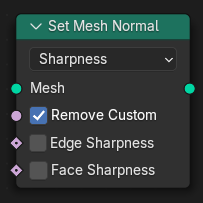
The Set Mesh Normal node stores a normal vector for each mesh element.
This can be used to control shading appearance and influence subsequent operations that rely on surface normals.
Inputs – Уводи
- Mesh – Сіть
Standard geometry input.
- Remove Custom Sharpness mode
If enabled, removes any existing custom normals or sharpness data.
- Edge Sharpness Sharpness mode
Boolean field that defines whether an edge is marked sharp. True values result in sharp edges; false values result in smooth shading.
- Face Sharpness Sharpness mode
Boolean field that defines whether a face is marked flat. True values result in flat-shaded faces; false values result in smooth shading.
- Custom Normal Free mode, Tangent Space mode
The vector to store as the custom normal.
Властивості
- Режим
Storage mode for custom normal data:
- Гострота – Sharpness:
Store the sharpness of each face or edge. Similar to the «Shade Smooth» and «Shade Flat» operators.
- Free – Вільно:
Store custom normals as simple vectors in the local space of the mesh. This is efficient and fast to evaluate but does not support deformation.
- Простір Тангенса:
Store normals in a deformation dependent custom transformation space. This method is slower, but can be better when subsequent operations change the mesh without handling normals specifically.
- Domain Free mode
Attribute domain to store free custom normals.
- Вказування – Point:
Store normals per vertex.
- Обличчя:
Store normals per face.
- Face Corner:
Store normals per face corner, this domain is necessary to bake existing mixed sharp and smooth edges into the custom normal vectors.
Outputs – Виводи
- Mesh – Сіть
Standard geometry output.